A modern, dark-mode-first MongoDB GUI. Built as a daily-driver alternative to MongoDB Compass, focused on speed, density, and a polished editing experience.


- Multiple connections, side-by-side. Connect to as many clusters as you want; each runs an independent pool. Drag-reorder them in the sidebar, manage them with right-click context menus.
- Built-in SSH tunnelling. Point a connection at a cluster that is only reachable from a jump host — key, password or agent auth, no external port forwards. Because the tunnel is a dynamic SOCKS5 proxy rather than a single forwarded port, the driver reaches every replica-set member it discovers, resolved on the SSH server's side.
- Three query modes per tab. Switch a single tab between Simple (filter / projection / sort), Aggregation pipeline, and Shell (
db.coll.find().limit()syntax) without losing state. - Mongo shell syntax everywhere. Type
ObjectId("…"),ISODate("…"),UUID("…"),NumberLong("…")etc. directly in filters and editors — MongoBench parses it into canonical EJSON before sending. - Optimistic concurrency on writes. Every edit and delete includes a sha-256 hash precondition of the document; concurrent edits surface as conflicts instead of silently overwriting.
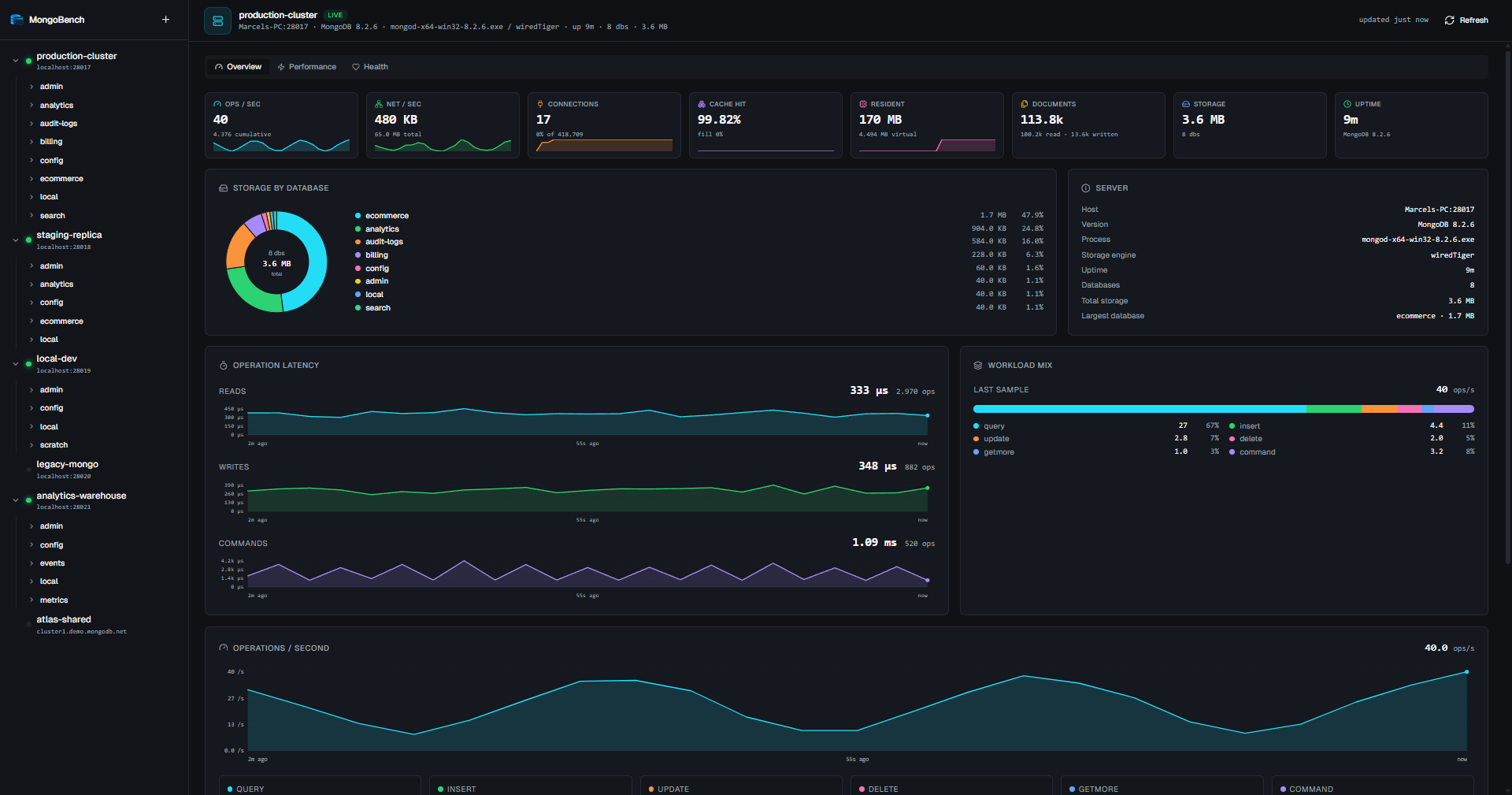
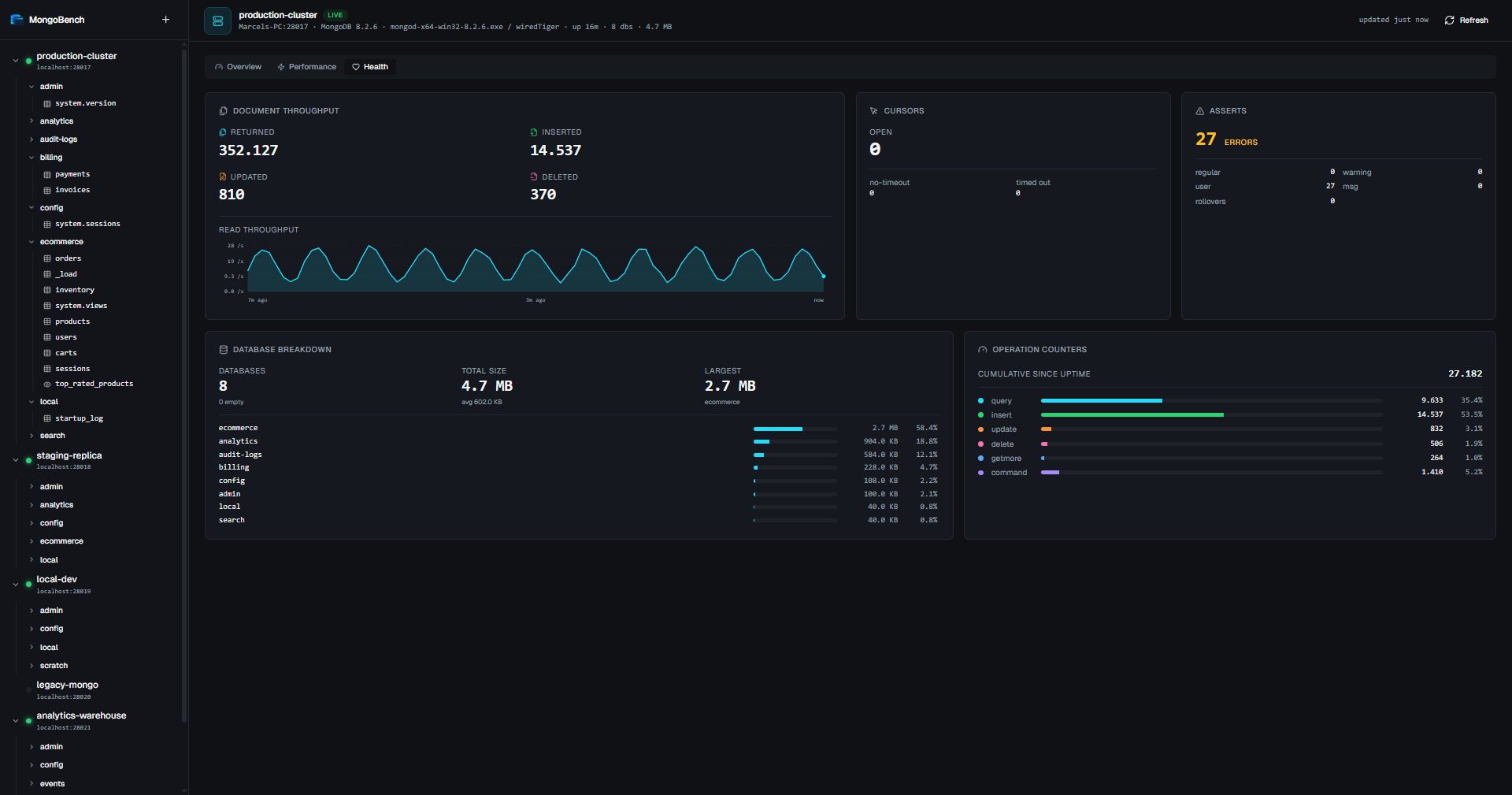
- Built-in observability. Per-connection dashboard with op rate, read/write/command latency, connection pool state, cache fill, network throughput, and a per-database storage breakdown.
- Updates you decide on. MongoBench tells you when a newer release exists and shows the download progress, but nothing is fetched or installed until you click. Builds are unsigned — the app never replaces its own binary behind your back.
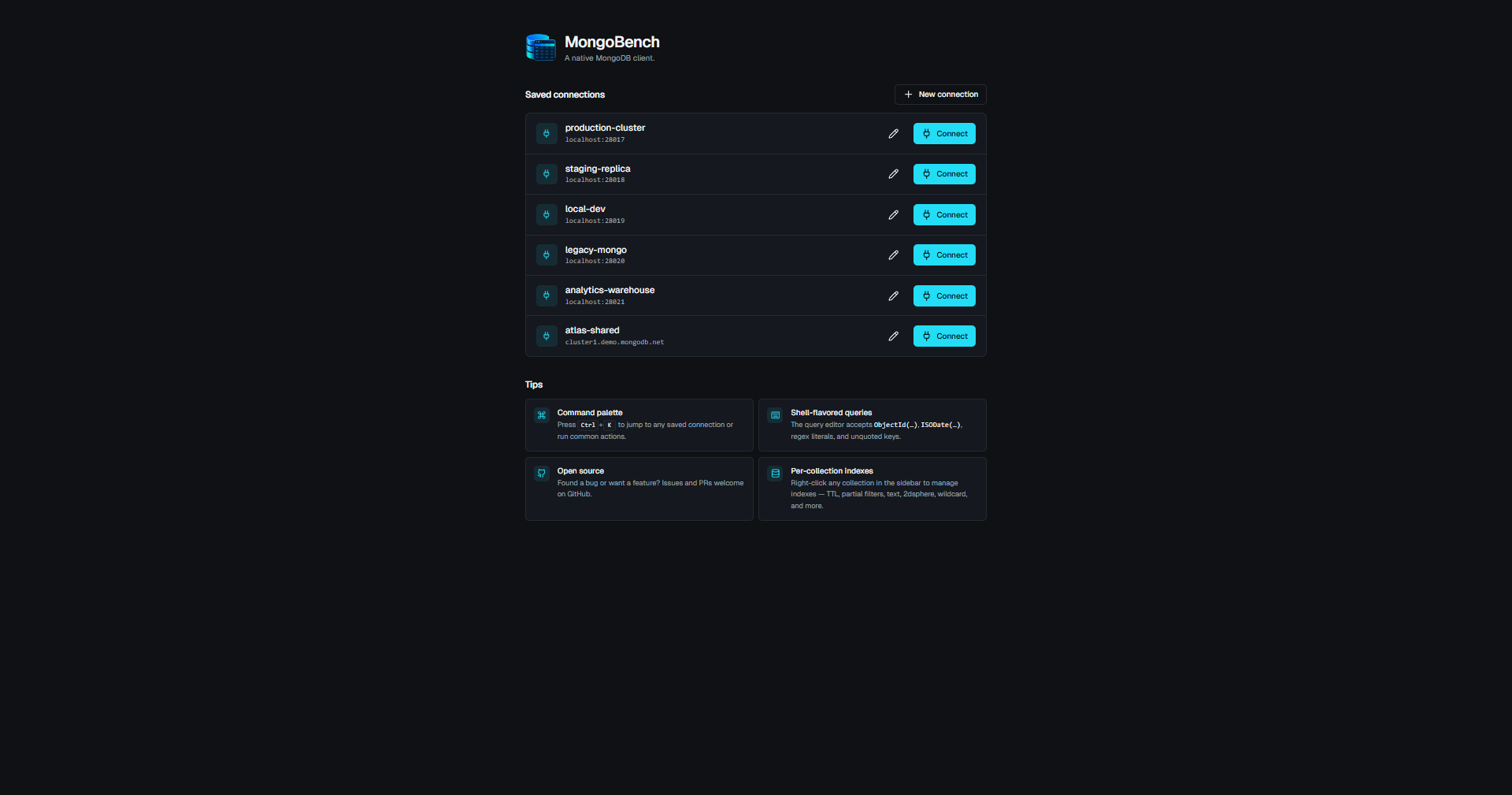
Saved connections at a glance with quick-connect buttons and inline tips.
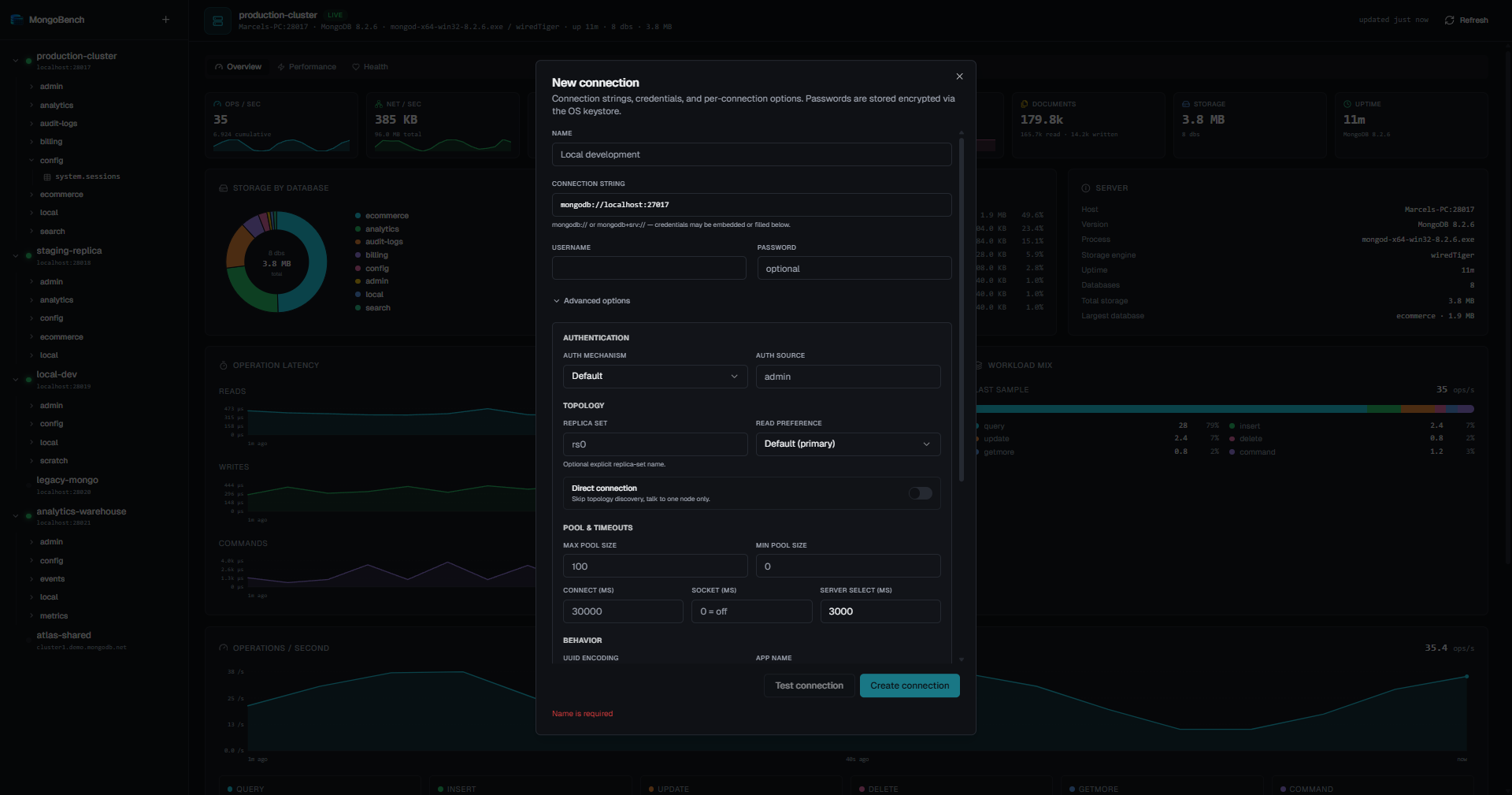
Full driver-option surface — auth, SSH tunnel, topology, pool, timeouts, UUID encoding, display timezone.
Live per-connection stats. The hero shot above is the Overview tab; the Health tab focuses on document throughput, cursors, asserts, and a per-database breakdown.
Type-aware rendering — ObjectId, Date, Decimal128, UUID, Long, Binary, regex — each with its own kind badge.
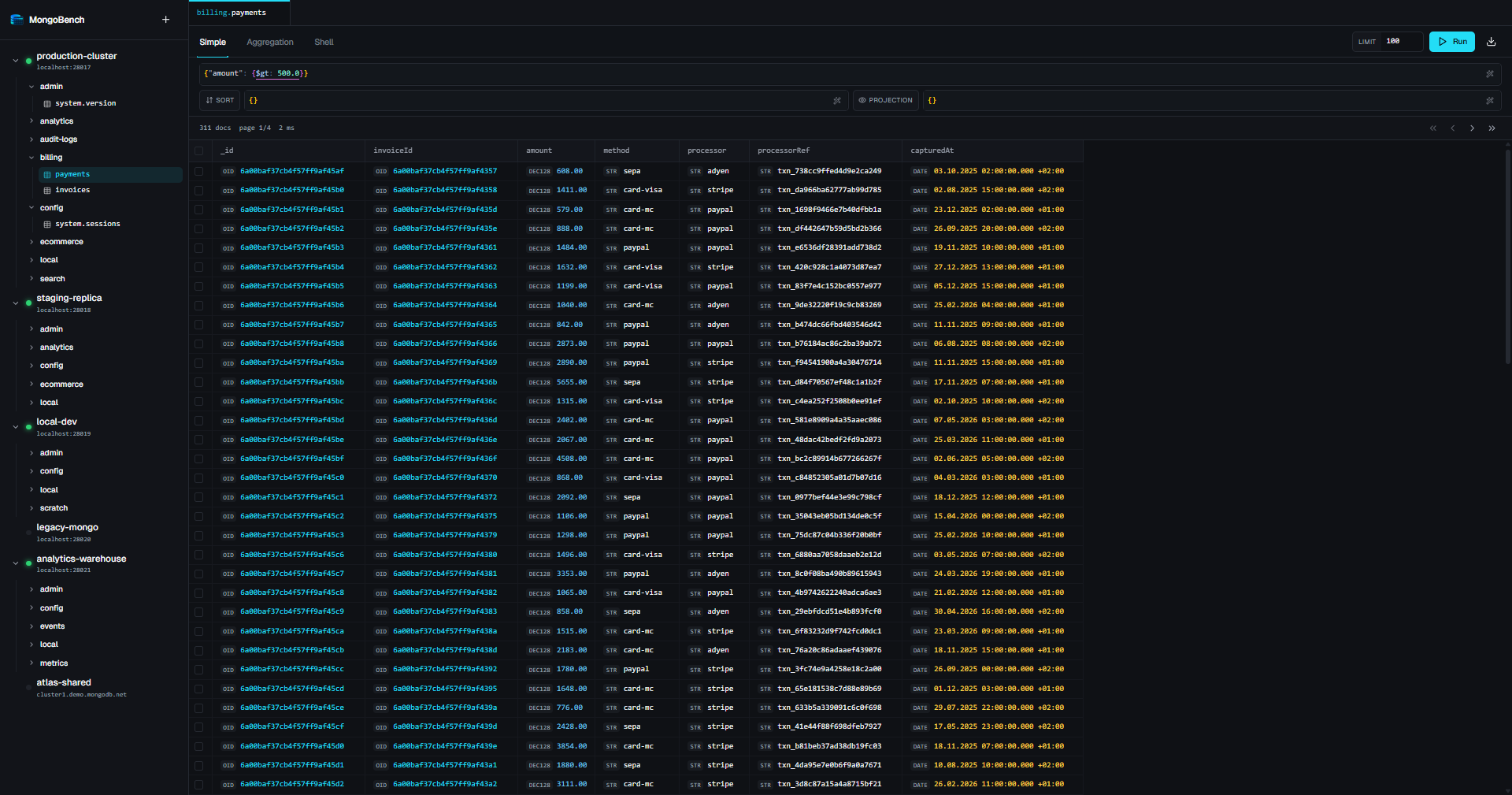
Right-click any row for View, Edit, Duplicate, Copy, Delete, plus a Lookup ObjectId in… submenu that jumps to the referencing collection.
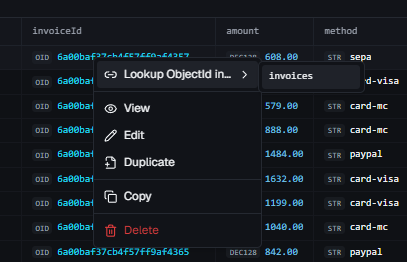
Monaco editor with mongo shell helpers (ObjectId(…), ISODate(…), NumberDecimal(…), UUID(…)). Hash-protected writes, view / edit / duplicate / insert modes.
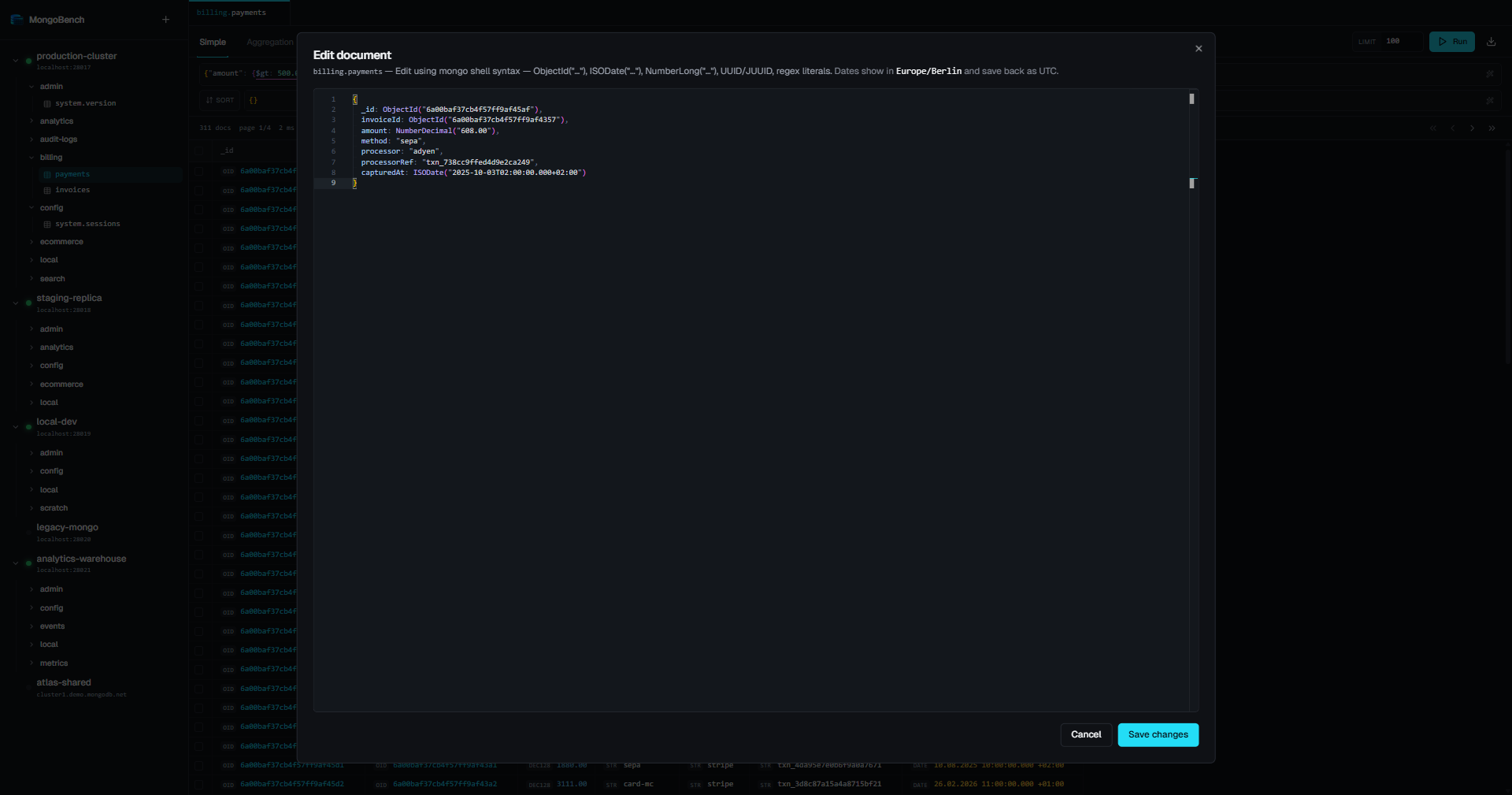
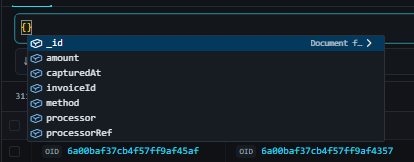
Operator autocomplete ($eq, $in, $elemMatch, $geoWithin, …) and field-name autocomplete from the most recent results.
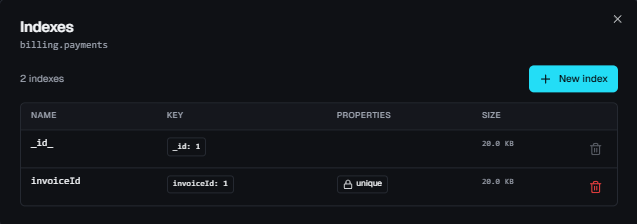
Per-collection index manager — list with key spec, properties, size; create with full option surface (TTL, partial filter, collation, weights, 2dsphere, wildcard).
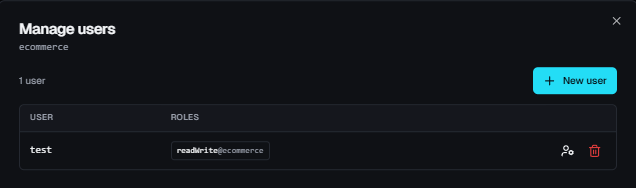
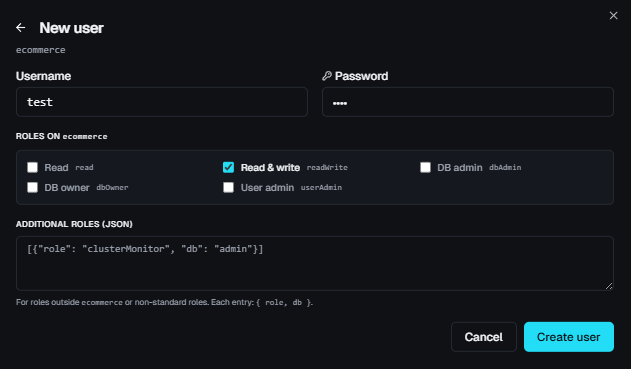
Per-database user management. Common-role shortcuts plus arbitrary custom roles.
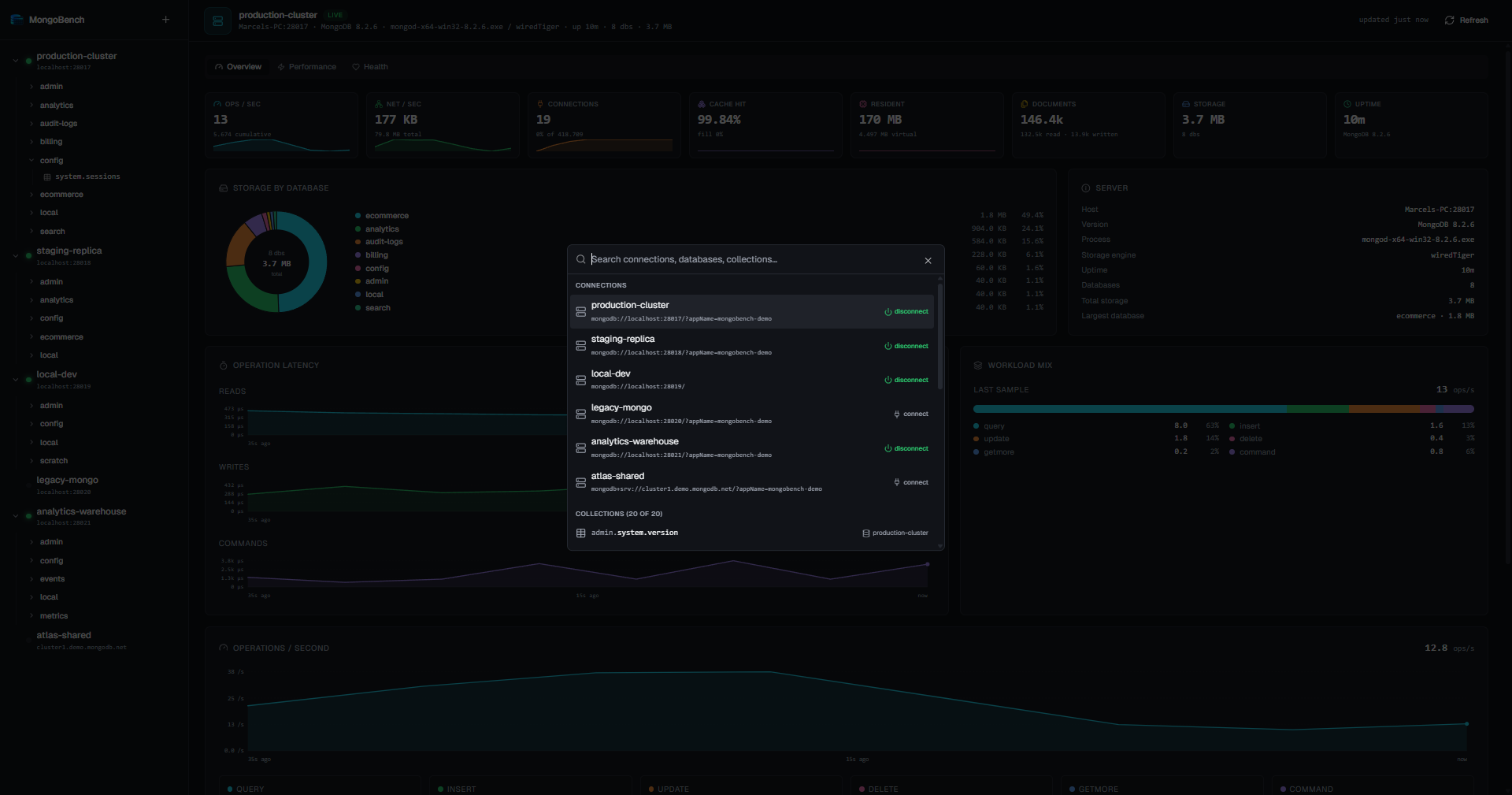
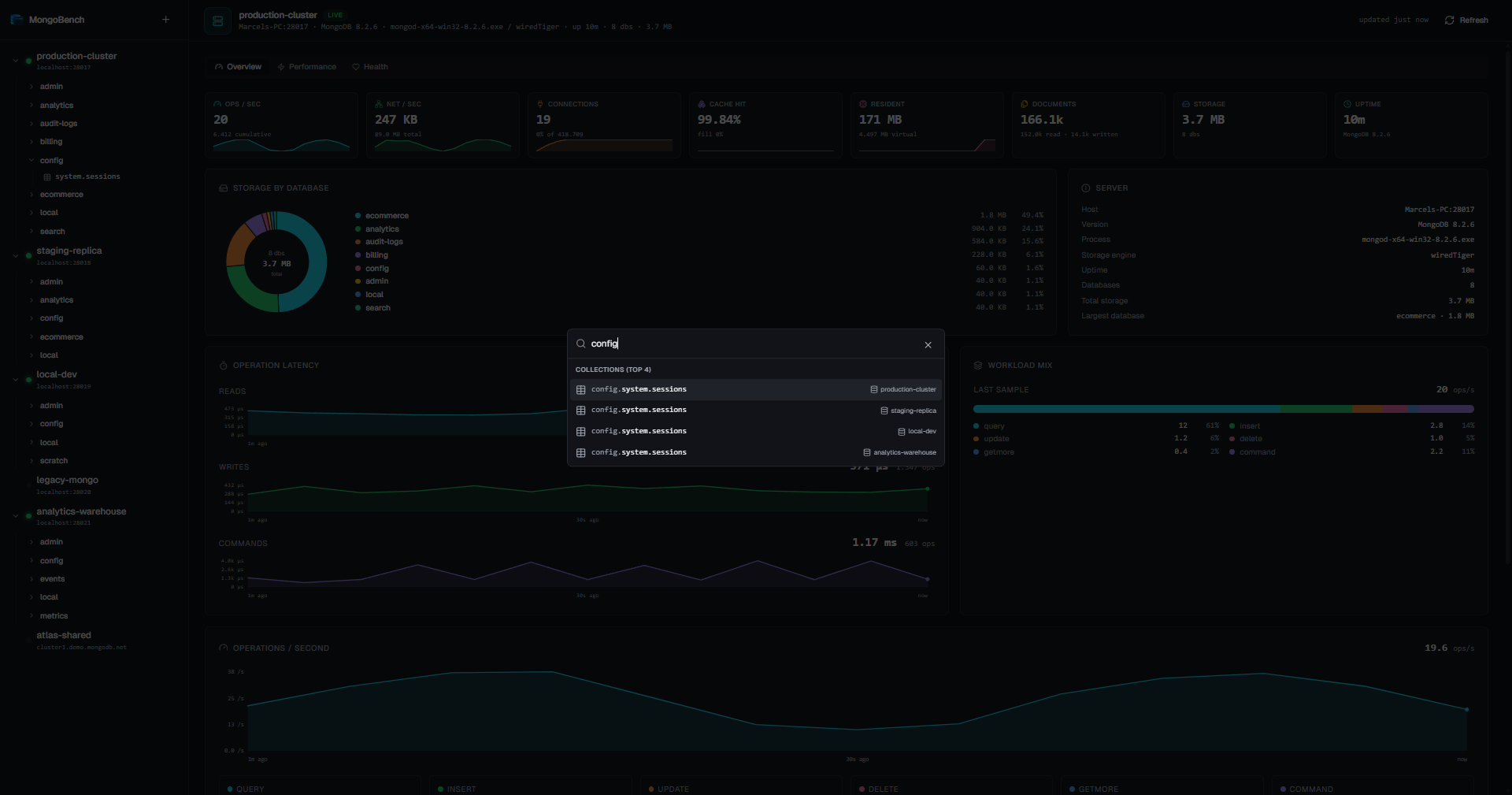
Ctrl+K / Cmd+K — fuzzy subsequence search across every active connection, database, and collection. Picking a result expands the sidebar and scrolls the row into view.
- Multiple active connections simultaneously, each with its own pool
- Encrypted password storage via OS keystore (Windows DPAPI, libsecret on Linux)
- Test before save — probes server, reports MongoDB version + ping latency
- SSH tunnel per connection, for hosts that are only routable from an SSH server:
- Auth via private key (+ passphrase), password, or the running SSH agent
- Key files are referenced by path — the key is read at connect time and never stored or copied
- Passwords and passphrases go into the same OS keystore as the MongoDB password
- Host keys are checked against your
~/.ssh/known_hosts; an unknown host is pinned on first use and itsSHA256:fingerprint surfaced for you to verify. A key that later changes is a hard failure - Implemented as a loopback SOCKS5 proxy over the SSH session (with per-tunnel random credentials), handed to the driver as
proxyHost/proxyPort— so topology discovery works: list every replica-set member in the URI under the names the SSH server resolves.mongodb+srv://is the exception, as its DNS lookup still happens locally - A tunnel that dies takes its connection down and says so, instead of leaving a connection that only looks alive
- Drag-to-reorder saved connections in the sidebar
- Right-click context menu per connection: connect / disconnect, edit, delete, new database, refresh, copy URI
- Full driver option surface, persisted per connection:
- URI:
mongodb://andmongodb+srv:// - Auth:
SCRAM-SHA-256,SCRAM-SHA-1,DEFAULT, customauthSource - Topology:
directConnection,replicaSet,readPreference(5 modes) - Pool:
minPoolSize,maxPoolSize - Timeouts:
connectTimeoutMS,socketTimeoutMS,serverSelectionTimeoutMS - Behavior:
retryWrites,retryReads,appName,tls - Display:
uuidEncoding(default / Java legacy), IANAtimezone,authorizedOnlyfilter
- URI:
- Three-level tree: connection → database → collection
- Live status dot per connection (connected / disconnected / busy)
- Right-click on a database: new collection, manage users, drop, copy name
- Right-click on a collection: open, info, copy namespace, insert document, manage indexes, rename, drop
- Distinct icons for collections vs. views
- Hover-quick-create buttons on database rows
- Active tab is highlighted in the sidebar; opening a tab from the palette auto-expands and scrolls to the row
| Mode | Surface | Highlights |
|---|---|---|
| Simple | filter · projection · sort · skip · limit | EJSON or shell syntax, field-name autocomplete from last results |
| Aggregation | pipeline as [{ $match: … }, …] |
Monaco, full operator autocomplete |
| Shell | db.coll.find({…}).sort({…}).limit(n) |
Curated subset of mongosh syntax — find, findOne, aggregate, count, countDocuments, estimatedDocumentCount |
- Run: click button or
Ctrl+Enter/Cmd+Enter - Format:
Shift+Alt+F— custom formatter that preserves shell helpers - Operator autocomplete for every standard query operator (
$eq,$in,$elemMatch,$geoWithin,$jsonSchema, …)
- Auto-sized table columns, drag-to-resize, per-collection persistence
- Multi-select with
Shift+Clickrange select - Right-click row: view, edit, duplicate, delete, copy
_id, jump to referenced ObjectId (cross-collection lookup submenu) - View / edit modes:
- Canonical EJSON (
{ "$oid": "…" },{ "$date": "…" }, …) or relaxed display - Shell-syntax accepted on input, parsed before send
- sha-256 hash precondition on
replaceOne/deleteOneto catch concurrent edits
- Canonical EJSON (
- Bulk delete via multi-select + confirm
- Export the current result set as JSON, CSV or TSV
- Type-aware rendering in the table:
ObjectIdas hex string with kind badgeDaterendered in the connection's display timezone (IANA)UUID(BSON subType 4 always; subType 3 only ifuuidEncoding: "java", with byte-reversal)Decimal128,Longas exact stringsBinary,Regex, nested objects / arrays summarized
- List with name, key spec, type (1/-1/text/2dsphere/2d/hashed), TTL, uniqueness, sparseness, hidden flag, partial filter, collation, weights
- Create with full option surface:
unique,sparse,hidden,expireAfterSeconds,partialFilterExpression,collation,weights,default_language,language_override,textIndexVersion,2dsphereIndexVersion,bits,min,max,wildcardProjection - Drop with confirmation (
_idindex protected) - Per-index size from
collStats
- List per-database users with their roles
- Create with username, password, role assignments per database
- Common-role shortcuts:
read,readWrite,dbAdmin,dbOwner,userAdmin— plus arbitrary custom roles - Update password and / or roles independently (preserve unchanged fields)
- Drop with confirmation
- Create / drop database (with confirmation, closes affected tabs)
- Create / rename / drop collection
- Collection info dialog: namespace, document count, average doc size, storage size (compressed + uncompressed), index count, free space, capped status
Per-connection live view, sampled every 5 s, sliding 5-min history:
- KPIs: ops/sec, current connections (with cap), cache fill %, resident memory, total storage
- Charts with hover crosshair + tooltips:
- Operation latency (read / write / command, µs)
- Operations breakdown (query / insert / update / delete / getmore / command)
- Network throughput (bytes in / out)
- Storage pie: top databases + aggregated "other" wedge, total in the center
- Trigger:
Ctrl+K/Cmd+K - Fuzzy subsequence matching with prefix-aware scoring across all active connections (databases + collections + saved connections)
- Pre-fetches collection metadata when opened so search is instant
- Result actions: open collection (auto-expand + scroll in sidebar), connect / disconnect
- Dark theme with cool, neutral palette — no warm undertones
- Geist Variable for UI, JetBrains Mono for code; tabular numerals throughout
- Custom Monaco theme matching the app palette
- Custom scrollbars (Chromium): 10 px, transparent track, primary-tinted on grab
- Status indicators everywhere: spinners on pending operations, success / error toasts, hash-protected badges in the status bar
| Platform | Download |
|---|---|
| Windows (x64) | MongoBench-Setup-<version>-x64.exe from Releases — NSIS installer, per-user, no admin |
| Linux (x64) | MongoBench-<version>-x86_64.AppImage — chmod +x and run |
| Arch / AUR | PKGBUILD shipped under packaging/arch/ or via AUR: paru -S mongobench-git / yay -S mongobench-git |
Builds are unsigned. On first launch on Windows you'll see SmartScreen — click "More info → Run anyway".
Installed builds ask GitHub Releases once at startup whether a newer version exists. If there is one, a notification appears in the corner — the further behind you are, the louder it is, and a missed major version is flagged in red.
Nothing happens until you act on it. Install update starts the download and shows its progress; Restart now hands off to the installer, or you can ignore it and the update is applied the next time you start MongoBench. Since these builds are unsigned, an app that swaps out its own binary unprompted is not something we're willing to ship — and an installer running silently while you work will close the app mid-session to replace its files.
The Arch package ships without an update feed and is updated through the AUR like any other package.
git clone https://github.com/ByteExceptionM/MongoBench
cd MongoBench
npm install
npm run dev          # launches the app with HMR
Useful scripts:
| Command | What it does |
|---|---|
npm run dev |
Run the app with hot reload (renderer) and main-process restart |
npm run build |
Build all three processes into out/ |
npm run dist:win |
Build a Windows NSIS installer into dist/ |
npm run dist:linux |
Build a Linux AppImage into dist/ |
npm run typecheck |
TypeScript project-references build, no emit |
npm run lint |
ESLint over src/ |
npm run format |
Apply Prettier |
npm test |
Vitest |
src/
├── main/        # Node side: window, services, IPC handlers, MongoClient pool
├── preload/     # contextBridge — typed API exposed to the renderer
├── renderer/    # React UI (Vite + Tailwind + shadcn/ui + Monaco)
└── shared/      # Types and Zod schemas shared across processes
- Electron 42 + TypeScript strict
- electron-vite — separate main / preload / renderer Vite configs
- React 18 + Zustand + TanStack Query
- Tailwind CSS v3 + shadcn/ui (Radix primitives)
- Monaco editor with custom
mongobench-darktheme - mongodb Node driver v7 + bson v7 (canonical / relaxed EJSON)
- electron-builder for packaging, electron-updater driving the user-initiated update flow
- Vitest for unit tests
- MongoDB 4.4+ (older versions may work but aren't tested)
- Auth mechanisms:
SCRAM-SHA-256,SCRAM-SHA-1,DEFAULT - TLS, replica sets, sharded clusters, direct connections
- IPv4 + IPv6, Atlas SRV, self-hosted, localhost
- Builds are unsigned — Windows shows SmartScreen on first launch
- No change-streams / live tail UI yet
- Shell mode parses a curated subset of
db.coll.<op>(...)syntax, not the full mongosh grammar - macOS builds aren't published (the codebase runs on macOS in dev; binaries just aren't in the release matrix yet)
MIT.