

Market Live extension for Dashfy - Real-time prices from the Pyth Network oracle.
This extension provides widgets to display live prices for crypto, equities, commodities, forex, and rates, streamed straight from the Pyth Network oracle on Solana.
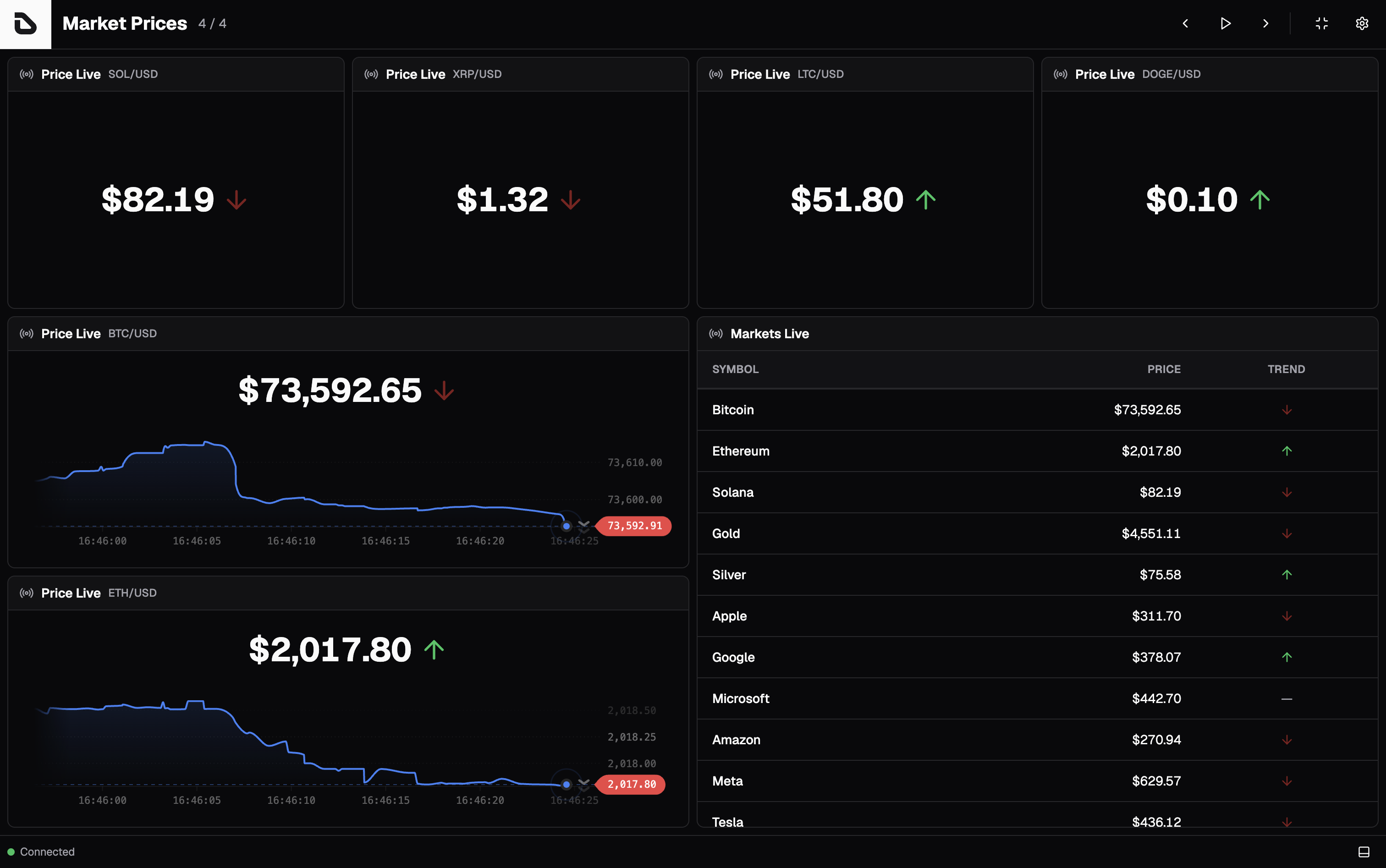
- 📈 Live prices: Sub-second price updates streamed from the Pyth oracle
- 🌍 Five asset classes: Crypto, US equities, commodities, forex, and rates
- 📊 Real-time chart: Rolling price chart with 1m/5m/15m windows
- 📋 Multi-asset table: Track many feeds side by side in one widget
- 🔌 No API key: Connects directly to Pythnet, so there is nothing to configure
- ⚡ Shared connection: All widgets reuse a single WebSocket, however many you render
- 🎨 Theme support: Works with all Dashfy themes (light/dark mode)
Install with your favorite package manager:
npm install @getdashfy/ext-market-livepnpm add @getdashfy/ext-market-liveyarn add @getdashfy/ext-market-livebun add @getdashfy/ext-market-liveUnlike most Dashfy extensions, Market Live needs no server setup, API client, or token. The widgets open their own connection to Pythnet from the browser, so there are only two steps.
Register Market Live widgets in your React application (App.tsx):
import { WidgetRegistry } from '@getdashfy/ui'
import { PriceLive, TableLive } from '@getdashfy/ext-market-live'

// Register Market Live extension
WidgetRegistry.addExtension('market-live', {
  PriceLive,
  TableLive,
})Add Market Live widgets to your dashboard configuration (dashfy.config.yml):
dashboards:
  - title: Markets Dashboard
    columns: 3
    rows: 2
    widgets:
      - extension: market-live
        widget: PriceLive
        feedId: crypto.BTC_USD
        x: 0
        y: 0
        columns: 2
        rows: 1

      - extension: market-live
        widget: TableLive
        subject: Watchlist
        x: 2
        y: 0
        columns: 1
rows: 2Every widget takes Pyth feeds by identifier, and resolvePythFeedId accepts three forms:
| Form | Example | Notes |
|---|---|---|
category.key |
equities.US_AAPL_USD |
Preferred, and unambiguous |
| Key only | BTC_USD |
Category defaults to crypto |
| Base58 address | GVXRSBjFk6e6J3NbVPXohDJetcTjaeeuykUpbQF8UoMU |
Any Pyth price account, even a new one |
The five categories are crypto, equities, commodities, forex, and rates, covering roughly 2,900 feeds in total. Keys come from the Pyth symbol with the category prefix stripped and separators replaced by underscores, so Crypto.BTC/USD becomes crypto.BTC_USD and Equity.US.AAPL/USD becomes equities.US_AAPL_USD.
Browse the full list at pyth.network/developers/price-feed-ids, or import a catalog and inspect its keys:
import { PYTH_CRYPTO_FEEDS, PYTH_EQUITIES_FEEDS } from '@getdashfy/ext-market-live'

Object.keys(PYTH_CRYPTO_FEEDS) // ['1INCH_USD', 'AAVE_USD', 'ADA_USD', ...]
An unknown category or key throws, so a typo surfaces as a widget error rather than a silently blank price.
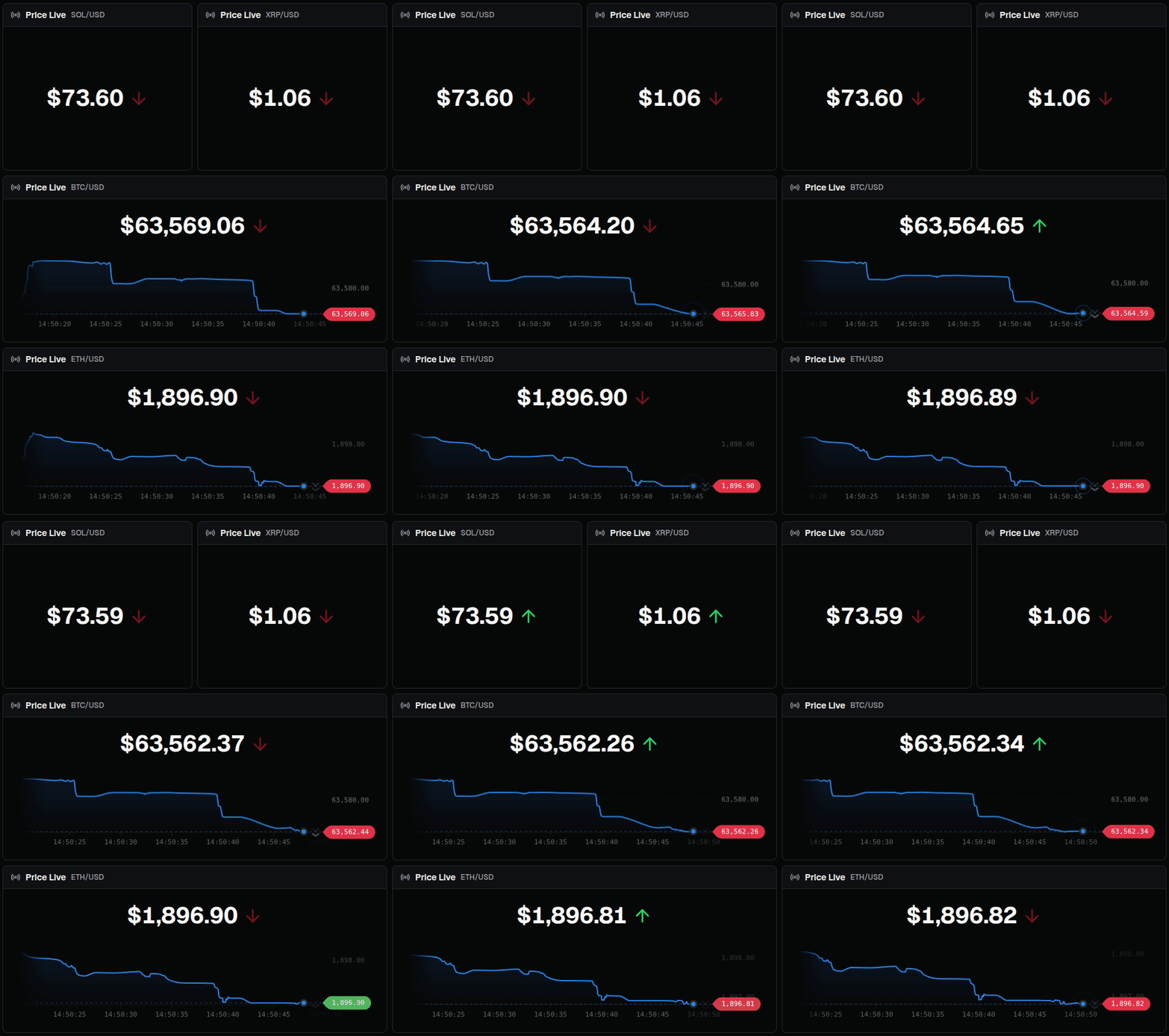
Display the live price of a single feed, with an optional rolling chart and trend arrow.
Parameters:
| Parameter | Type | Required | Default | Description |
|---|---|---|---|---|
title |
string | no | "Price Live" | Custom widget title |
subject |
string | no | derived from feed | Custom widget subject |
locale |
string | no | "en-US" | Locale for price formatting |
feedId |
string | no | crypto.BTC_USD |
Pyth feed identifier |
showChart |
boolean | no | true |
Show the rolling price chart below the price |
showTrend |
boolean | no | true |
Show the trend arrow next to the price |
showWindows |
boolean | no | true |
Show the 1m/5m/15m time window buttons |
When subject is omitted, the label is derived from feedId (crypto.BTC_USD becomes BTC/USD). A raw base58 address has no derivable label, so pass subject explicitly in that case.
Example:
- extension: market-live
  widget: PriceLive
  feedId: crypto.BTC_USD
  columns: 2
  rows: 1
Example (price only, no chart):
- extension: market-live
  widget: PriceLive
  subject: Gold
  feedId: commodities.XAU_USD
  showChart: false
  columns: 1
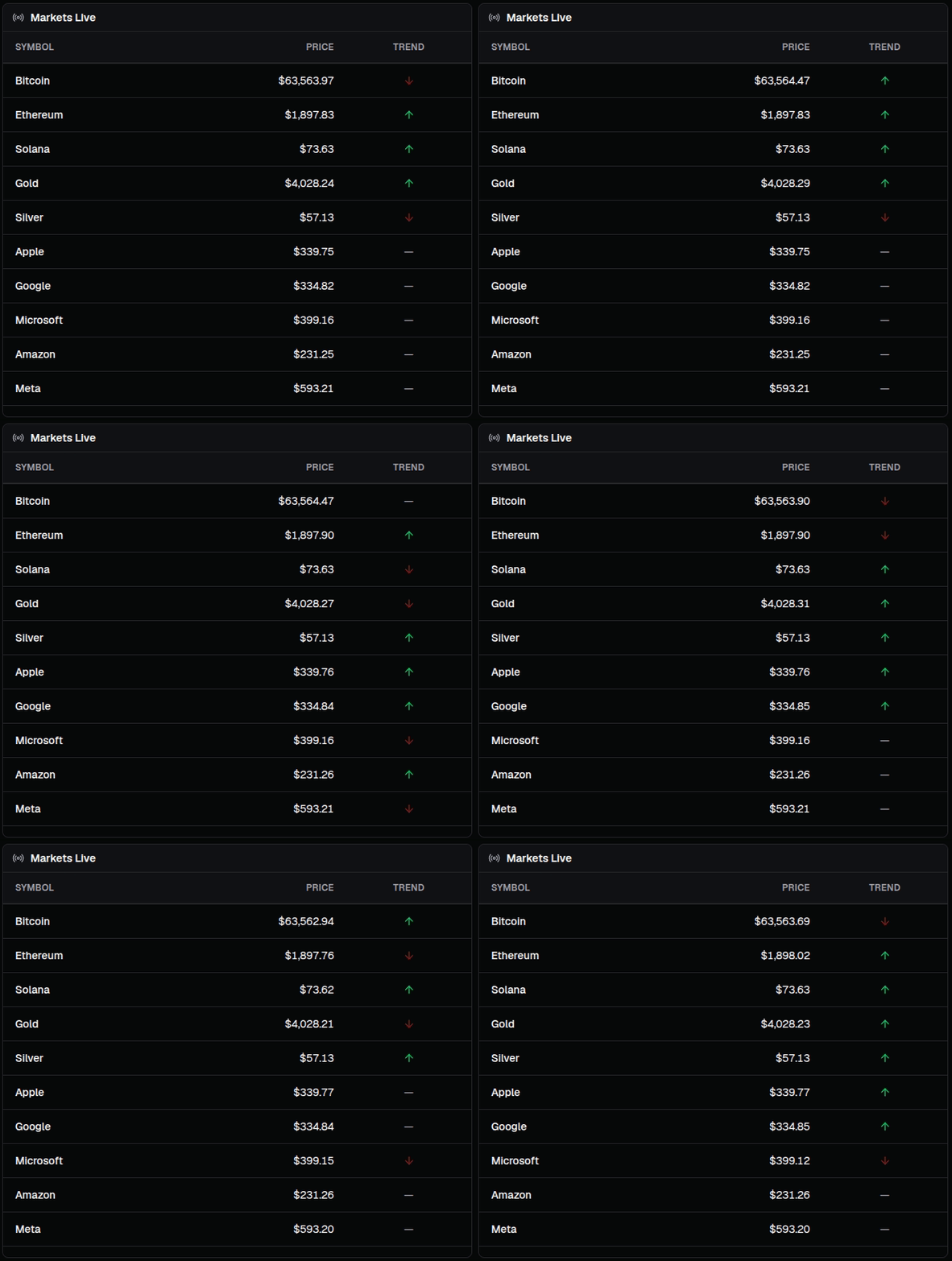
rows: 1Display a table of live prices for many feeds at once, each row showing symbol, price, and trend.
Parameters:
| Parameter | Type | Required | Default | Description |
|---|---|---|---|---|
title |
string | no | "Markets Live" | Custom widget title |
subject |
string | no | - | Custom widget subject |
locale |
string | no | "en-US" | Locale for price formatting |
feeds |
TableLiveFeed[] |
no | see below | Feeds to display, one per row |
showTrend |
boolean | no | true |
Show the trend arrow in the Price column |
Each entry in feeds is an object with an id (any feed identifier) and an optional label. When label is omitted, the row falls back to the derived pair, then to the raw id.
The default feeds list is a broad market snapshot: Bitcoin, Ethereum, Solana, gold, silver, and the seven largest US tech equities.
Example:
- extension: market-live
  widget: TableLive
  subject: Crypto Watchlist
  feeds:
    - id: crypto.BTC_USD
      label: Bitcoin
    - id: crypto.ETH_USD
      label: Ethereum
    - id: crypto.SOL_USD
      label: Solana
  columns: 1
  rows: 2
Example (mixed asset classes):
- extension: market-live
  widget: TableLive
  subject: Macro
  feeds:
    - id: commodities.XAU_USD
      label: Gold
    - id: forex.EUR_USD
      label: Euro
    - id: equities.US_AAPL_USD
      label: Apple
  columns: 1
  rows: 2
Rows render as soon as any feed reports, so a slow feed shows a placeholder instead of blocking the whole table.
The package also exports the Pyth plumbing behind the widgets, for building your own custom widgets on the same shared connection.
| Export | Description |
|---|---|
subscribeToPrice(feedPublicKey, callback) |
Subscribe to a feed; the callback receives (price, status) per update |
unsubscribeFromPrice(feedPublicKey, callback) |
Remove a callback, tearing down the connection once the last one is gone |
getPythConnection() |
The shared PythConnection, or null before the first subscription |
resolvePythFeedId(value) |
Resolve any feed identifier to a Solana PublicKey |
getPythFeedDisplayPair(feedId) |
Human-readable pair for a feed (crypto.BTC_USD becomes BTC/USD) |
isPythErrorStatus(status) |
Whether a status means the price is unreliable |
PYTH_ERROR_STATUSES |
The statuses treated as errors |
PYTH_CRYPTO_FEEDS and the four siblings |
Feed catalogs keyed by symbol, one per category |
import {
  PYTH_CRYPTO_FEEDS,
  subscribeToPrice,
  unsubscribeFromPrice,
} from '@getdashfy/ext-market-live'
import * as React from 'react'

const MyPriceWidget = () => {
  const [price, setPrice] = React.useState(0)
  const feedId = PYTH_CRYPTO_FEEDS.BTC_USD

  React.useEffect(() => {
    const handleUpdate = (newPrice: number) => setPrice(newPrice)

    subscribeToPrice(feedId, handleUpdate)

    return () => unsubscribeFromPrice(feedId, handleUpdate)
  }, [feedId])

  return <div>${price}</div>
}
All subscribers share one Solana RPC connection and one PythConnection. Connection rebuilds are debounced, so subscribing to many feeds in a loop triggers a single rebuild rather than one per feed.
Widgets surface the Pyth price status rather than guessing at stale data:
Live— price and confidence are available, so the value is rendered.Connecting— the initial state before the first update arrives; widgets show a loader.Halted,Auction,Ignored,Unknown— the price is unreliable and widgets show an error state.
Equity feeds are only Live during US market hours; outside them they report a non-trading status, which is expected rather than a failure.
The catalogs under src/lib/pyth-feeds/ are generated from the live Pythnet program accounts and are checked in, so no network access is needed at build or run time. To refresh them after Pyth adds feeds:
pnpm generate:feedsThe script rewrites one file per category plus an index barrel. The files carry an AUTO-GENERATED - DO NOT EDIT header; edit the generator at src/scripts/generate-pyth-feeds.ts instead.
Solution: The widgets reach Pythnet over a WebSocket from the browser. Check that the network or a corporate proxy is not blocking the Pythnet RPC endpoint, and that no ad blocker is interfering with the connection.
Solution: Check the identifier against the feed identifier forms. Categories are crypto, equities, commodities, forex, and rates, and keys use underscores (BTC_USD, not BTC/USD).
Solution: Equity feeds only trade during US market hours and report Halted or Unknown outside them. Use a crypto feed to confirm the connection itself is healthy, since crypto trades continuously.
Solution: A raw base58 feed address has no reverse lookup, so no label can be derived. Pass subject explicitly, or use the category.key form instead.
Contributions are welcome. For issues and pull requests related to the extension, use the dashfy/dashfy-ext-market-live repository. Framework contributions belong in dashfy/dashfy.
Join the community on Dashfy's Discord server to discuss the project, ask questions, or get help.
Join the conversation on X (Twitter) and follow @dashfydev for updates and announcements.
This project is licensed under the AGPL-3.0 License - see the LICENSE file for details.