






A customizable status bar for Claude CLI — built so you always know which project, branch, model, and budget you're working with, at a glance.
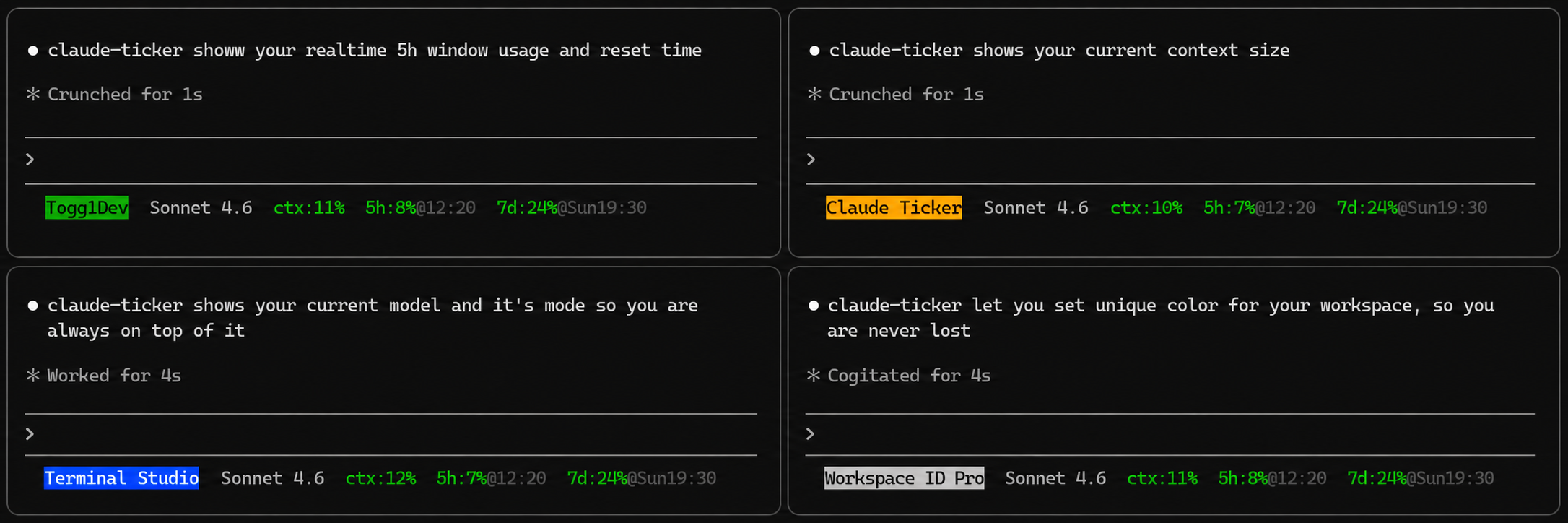
Zero token cost. claude-ticker runs entirely on your machine as a status-bar hook — it never touches the Claude API and uses none of your context window or quota.
npm install -g claude-ticker
claude-ticker init
That's it. init wires claude-ticker into Claude CLI's settings.json (your existing config is backed up automatically). Restart Claude CLI and the status bar is live.
Want to see it without restarting?
claude-ticker previewThe flagship feature, and the one that changes how you work.
Assign every project a short alias and a background color. From that moment on, every Claude session and every terminal shows the same color-coded label for the repo you're in.
claude-ticker dir-name set ~/ws/my-app "my-app"
claude-ticker dir-color set ~/ws/my-app blue

claude-ticker dir-name set ~/ws/client-work "client"
claude-ticker dir-color set ~/ws/client-work red
When you tab between five terminals running five Claude sessions, your eyes land on the right one in under a second. No more pwd. No more "wait — which repo did I just run that command in?" No more pasting changes into the wrong project.
git_branch is on by default. Every render of the status bar shows the branch you're on plus a live diff summary: insertions in green and deletions in red, e.g. main +12 -3. You don't accidentally commit to main, lose track of a feature branch mid-session, or get surprised by a stale checkout after switching worktrees — and you always know how much uncommitted work is in flight.
When the working tree is clean, only the branch name is shown.
Tip: Paired with
dir-name+dir-color, this is the combo that makes claude-ticker indispensable when you're juggling sessions: one Claude onfeature/paymentsin the API repo (blue), another onbugfix/loginin the web repo (red), a third onmaindoing a docs read (green). All instantly readable from the bar — you stop "swapping contexts" in your head because the bar already shows you which context you're in.
The fields that matter most when you're deep in a session:
ctx— context window fill %. Know when you're approaching a compaction.5h/7d— Pro / Max rate-limit usage with reset times.cost— session spend in USD.duration— wall-clock time on the current session.lines— lines added/removed this session.
Each shifts green → yellow → red as you climb toward a limit, with configurable thresholds (default: warn at 50%, critical at 75%). You don't read the numbers — you read the color.
Show, hide, reorder, or recolor any field with a single command. Override colors with named colors, CSS color names (coral, tomato, …), or hex (#ff7f50). Configure the separator, 12h / 24h clock, and your own warning / critical thresholds.
- Sub-millisecond branch resolution. Directly parses
.git/HEADto resolve your branch without spawning costly child processes. Diff stats are fetched via a lightweightgit diff --shortstat. - No runtime dependencies. Nothing extra in your
node_modules. - ~29 kB on the wire. Installs in a blink, starts in a blink.
- No tokens consumed. Runs as a local status-bar hook, not an API client.
- Safe
init. Your existingsettings.jsonis backed up before any changes.
- Claude CLI installed (
npm install -g @anthropic-ai/claude-code) - Node.js ≥ 18 (already required by Claude CLI)
Wires claude-ticker into Claude CLI as the status bar. Your existing ~/.claude/settings.json is backed up to settings.json.bak before any changes.
Renders the status bar with sample data, so you can see your current configuration without restarting Claude CLI.
claude-ticker fields [list]              # show all fields and visibility
claude-ticker fields show <field>        # enable a field
claude-ticker fields hide <field>        # disable a field
claude-ticker fields order <f1> <f2> …   # set display order
claude-ticker fields reset               # reset to default fields
Available fields:
| Field | Default | Description |
|---|---|---|
dir |
on | Current working directory (home folder shortened to ~) |
git_branch |
on | Current git branch with diff stats (branch +ins -del) |
model_id |
on | Active model ID, claude- prefix stripped (e.g. sonnet-4-6) |
ctx |
on | Context window fill % — how full this conversation's memory is |
5h |
on | 5-hour usage % with reset time |
7d |
on | 7-day usage % with reset day+time |
model |
off | Active Claude model display name, "Claude " prefix stripped |
worktree |
off | Git worktree branch, shown as wt:<branch> |
cost |
off | Session cost in USD, e.g. $0.042 |
duration |
off | Session wall time, e.g. 4m32s |
lines |
off | Lines added/removed this session, e.g. +84 -12 |
session |
off | Session name, shown as session:<name> |
version |
off | Claude Code version, e.g. v1.9.0 |
effort |
off | Reasoning effort level, e.g. effort:high |
thinking |
off | Extended thinking state, e.g. thinking:on |
vim |
off | Vim mode (INSERT, NORMAL, etc.) |
agent |
off | Agent name when running a sub-agent, shown as agent:<name> |
Examples:
claude-ticker fields hide model
claude-ticker fields show cost duration
claude-ticker fields order ctx 5h 7d dir cost
claude-ticker color [list] # show colors and thresholds
claude-ticker color set <field> <color> # set a field's color
claude-ticker color thresholds <warn%> <crit%> # set dynamic thresholdsAvailable colors: red green yellow blue magenta cyan white dim dynamic none, any CSS color name (coral, tomato, …), or hex (#rgb / #rrggbb).
dynamic— percentage / level fields only; color shifts green → yellow → red based on thresholds (default forctx,5h,7d,effort)none— no color applied
Default thresholds: warning at 50%, critical at 75%.
Field color defaults:
| Field | Default color |
|---|---|
dir |
yellow |
git_branch |
cyan (diff: green/red) |
worktree |
cyan |
agent |
magenta |
session |
dim |
version |
dim |
ctx |
dynamic |
5h |
dynamic |
7d |
dynamic |
effort |
dynamic |
| everything else | none |
Examples:
claude-ticker color set dir cyan
claude-ticker color set ctx green          # always green, ignores thresholds
claude-ticker color set model coral        # CSS color name
claude-ticker color set model "#ff7f50"    # hex color
claude-ticker color thresholds 40 70 # warn earlierAssign a background color to a directory. When your current working directory is at or under a configured path, the dir field is highlighted with that background color. The longest-matching path wins.
claude-ticker dir-color [list]                 # list all mappings
claude-ticker dir-color set <path> <color>     # assign a background color
claude-ticker dir-color reset <path>           # remove a mapping
Valid colors: red green yellow blue magenta cyan white, any CSS color name (coral, tomato, …), or hex (#rgb / #rrggbb).
~ in paths is expanded to your home directory. Use . to refer to the current directory. Matching is case-insensitive on Windows.
Examples:
claude-ticker dir-color set ~/ws/my-project blue
claude-ticker dir-color set ~/ws/client-work red
claude-ticker dir-color set . coral          # current directory, CSS color
claude-ticker dir-color set . "#4682b4"      # current directory, hex color
claude-ticker dir-color list
claude-ticker dir-color reset ~/ws/my-project
claude-ticker dir-color reset . # current directoryAssign a human-readable alias to a directory. When your current working directory is at or under a configured path, the alias is shown in the dir field instead of the full path. Pairs with dir-color — the alias gets the background color if one is set.
claude-ticker dir-name [list]                       # list all aliases
claude-ticker dir-name set <path> <name>            # assign an alias (shows alias only)
claude-ticker dir-name set-long <path> <name>       # assign an alias (shows alias/subdir/remainder)
claude-ticker dir-name reset <path> # remove an aliasset— always shows just the alias, regardless of how deep in the directory tree you areset-long— shows the alias plus the subdirectory path relative to the named root (e.g.my-project/src/components)
Name constraints: 2–30 characters, no ANSI escape codes. Matching uses the longest-matching path prefix, same as dir-color. ~ is expanded to your home directory. Use . to refer to the current directory.
Examples:
claude-ticker dir-name set ~/ws/my-project "my-project"
claude-ticker dir-name set-long ~/ws/client-work "client"
# → shows "client/src/api" when in ~/ws/client-work/src/api

claude-ticker dir-name set . "cur"           # alias for current directory
claude-ticker dir-name set-long . "cur"      # long form for current directory

claude-ticker dir-name set ~/ws/my-project "proj" && claude-ticker dir-color set ~/ws/my-project blue
# → "proj" shown with blue background

claude-ticker dir-name list
claude-ticker dir-name reset ~/ws/my-project
claude-ticker dir-name reset . # current directoryGet or set the string printed between fields. Default is two spaces (" ").
claude-ticker separator           # show current value
claude-ticker separator " | "     # set to " | "
claude-ticker separator " " # restore double-space (quote it)Controls how reset times are displayed. Default is 24h.
claude-ticker time 12h   # → 5h:8%@2:30PM
claude-ticker time 24h   # → 5h:8%@14:30
claude-ticker config [show] # print full JSON config
claude-ticker config reset # reset everything to defaultsSettings are stored in ~/.claude/claude-ticker.json. You can edit it directly or use the commands above — but you'll rarely need to touch it by hand.
{
  "fields": ["dir", "git_branch", "model_id", "ctx", "5h", "7d"],
  "colors": {},
  "thresholds": {
    "warning": 50,
    "critical": 75
  },
  "separator": "  ",
  "timeFormat": "24h",
  "dirColors": {},
  "dirNames": {}
}
colors defaults to {} — each field uses its built-in default color unless overridden here.
dirColors maps directory paths to background colors for the dir field.
dirNames maps directory paths to alias objects: { "name": "my-project", "long": false }. Use the dir-name command to manage these.
5h and 7d are only populated by Claude CLI for Claude.ai subscribers (Pro / Max) and only appear after the first API response in a session. They are silently omitted until data is available.
Issues and PRs welcome. The project has zero runtime dependencies — please keep it that way.
git clone https://github.com/dpkay-io/claude-ticker
cd claude-ticker
npm install
npm run dev    # watch mode
npm run build # compile to dist/I built claude-ticker because I was running multiple Claude sessions across repos and constantly losing track of which terminal was where. pwd-ing every two minutes broke my flow. The status bar fixes that — and once dir-color clicked, I couldn't go back. If it saves you the same friction, that's the whole point.
MIT