





Multilogin is a cloud phone platform for social media managers and creators who run multiple social profiles from one dashboard.
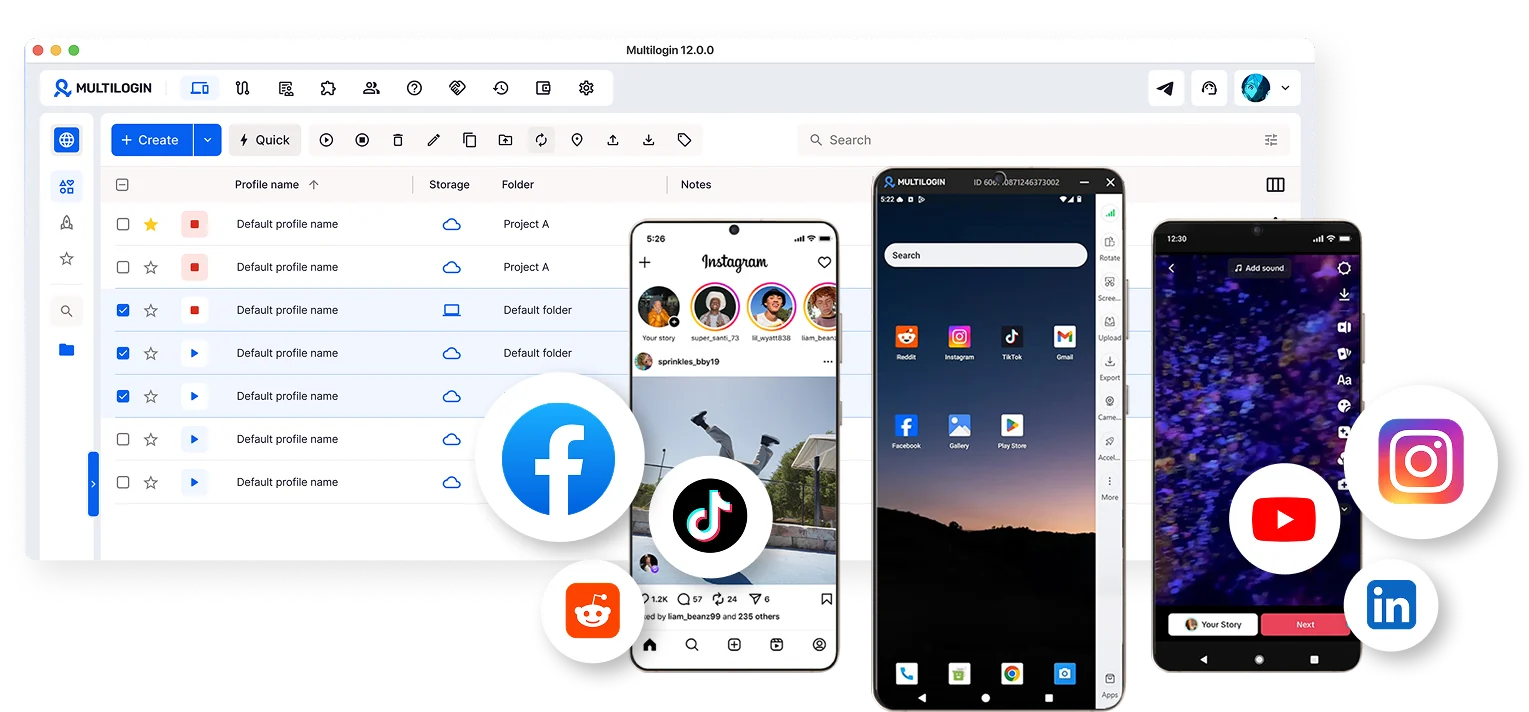
Multilogin is a cloud phone platform for social media managers and creators. You run multiple social profiles from one dashboard, on mobile apps and in the browser. Each mobile account runs in its own Android cloud phone. Each web account runs in its own browser profile. Upload content, automate posts and engagements, and manage everything from one place. No physical devices. No separate tools. No complicated setup.
Whether you manage five accounts or five hundred, Multilogin keeps it all simple, organized, and easy to scale.
📚 Visit the Multilogin Wiki: guides, use cases, academy, and glossary
📊 Multilogin Pricing — July 2026: complete overview of all pricing plans
You manage multiple social media accounts. And right now, that probably means:
- Switching between physical phones all day
- Watching accounts get banned after you log in from a new device or location
- Losing accounts because platforms linked them to each other
- Your whole team sharing the same IP and triggering security checks
- Juggling separate tools for proxies, VPNs, and browser profiles
- Going through 2FA every time a teammate logs into a client account
- Not knowing which profile is open in which window
- Paying for remote desktops or virtual machines just to keep accounts separate
Sound familiar? That is exactly what Multilogin was built to fix.
Multilogin gives you real Android cloud phones for mobile app accounts and isolated browser profiles for web accounts — all managed from one dashboard on your desktop. No physical devices. No complex setups. No guessing.
| What you need | How Multilogin handles it |
|---|---|
| Manage TikTok, Instagram, Facebook, Reddit, and YouTube, plus other social and mobile apps | Each account runs in its own Android cloud phone |
| Manage web-based accounts and ad dashboards | Each account runs in its own isolated browser profile |
| Keep accounts from being linked to each other | Real hardware IDs, unique fingerprints, matched geolocation per profile |
| Run Facebook and Google ad accounts without bans | Each profile has its own isolated session, cookies, and IP so platforms see separate advertisers |
| Manage client accounts without sharing passwords | Share profiles with team members via controlled access so they log in while you stay in control |
| Log into client LinkedIn, Instagram, or Facebook from any location without triggering 2FA | Each profile keeps consistent geolocation, IP, and device parameters between sessions |
| Scale TikTok and YouTube channels without shadow bans | Each channel runs in its own profile with a unique fingerprint and IP with no cross-account signals |
| Run Reddit, Quora, or review accounts for marketing | Isolated profiles with separate residential IPs prevent platform-level linking |
| Warm up new social media accounts naturally | Persistent app sessions carry logins, cache, and activity history over between sessions |
| Replace expensive remote desktops or virtual machines for your team | Cloud phones and browser profiles run directly from the desktop app with no VMs or RDP needed |
| Proxy management | Built-in residential proxies included in all plans, matched to each profile location |
| Team collaboration | Share profiles, set permissions, unlimited seats on Business plans |
| Automation for browser profiles | Works with Selenium, Puppeteer, Playwright, Postman, and Multilogin API |
Each cloud phone is a real Android device hosted in the cloud. Not an emulator. Not a simulation.
When you launch a cloud phone, it comes with:
- A unique IMEI, Android ID, and MAC address — genuine hardware-level identifiers
- GPS coordinates automatically matched to the assigned proxy location
- Persistent app data — cache, logins, and session history survive between sessions
- Built-in app store — install any app directly from the store inside the cloud phone, just like on a physical device
- APK upload — can't find an app in the store? Upload the APK file directly and install it manually
- Video upload — import video files to your cloud phone and use them inside apps like TikTok or Instagram for content posting
- Camera support — use your computer's webcam as the cloud phone's camera in real time, upload pre-recorded video streams, or connect an external microphone for audio
- File import and export — move files between your cloud phone and your local device anytime, in both directions
- Keyboard input — type directly from your computer keyboard inside the cloud phone, no extra setup needed
You pick the Android version (10 through 16), choose a device brand and model, assign a proxy, and launch. The app platform sees it as a completely separate physical device.
Each browser profile runs in an isolated Chromium-based environment with a unique digital fingerprint built from 50+ parameters — screen resolution, fonts, time zone, language, browser version, and more. Every website and platform sees it as a completely separate device.
Browser profiles are ideal for web-based multi-accounting because:
- Built-in residential proxies — no need to buy proxies separately. Every plan includes residential proxy traffic, and you can also connect your own external proxies.
- 150+ countries to choose from — pick any country or region for each profile. Each profile gets its own IP matched to its location, so every account looks like a real local user.
- Full isolation between profiles — cookies, cache, login sessions, and local storage never leak between profiles. One account cannot affect another.
- Unique fingerprint per profile — each profile gets its own browser fingerprint, making it appear as a completely different device to any platform.
- Chromium-based browser profiles — hardened against fingerprint detection.
- Quick cloning and bulk operations — duplicate profiles in seconds or run bulk actions across hundreds of profiles at once.
- Cloud or local storage — save profile data in the cloud and access it from any device, or keep it local for full control.
- Automation-ready — every browser profile works with Selenium, Puppeteer, Playwright, and Postman out of the box.
You manage both from the same desktop app, available for Windows, macOS, and Linux. No technical setup required. Launch, manage, and organize everything from one screen.
Multilogin is not an Android emulator. Cloud phones run on real Android hardware (versions 10–16) with genuine device identifiers. Android emulators run in simulated environments and are much easier for platforms to detect.
Each cloud phone includes:
- Unique IMEI, Android ID, and MAC address
- Persistent app data, cache, and login states between sessions
- Support for approximately 30 device types across 12 brands
- Full app compatibility — install from the built-in store or upload APKs directly
- Camera support — upload video streams or use your webcam in real time
- Keyboard input — type directly from your computer keyboard, no extra setup needed
- File import and export — move files to and from your cloud phone anytime
Supported Android versions: 10, 11, 12, 13, 14, 15, 16
Supported device brands:
- Samsung
- OPPO
- Xiaomi
- Vivo
- Redmi
- Honor
- Tecno
- Motorola
- Infinix
- realme
- OnePlus
App data, cache, and login states persist between sessions. This supports natural account warm-up and lets you continue exactly where you left off — every single time.
- Free residential proxy traffic included in all plans
- Mobile-grade proxies for cloud phones with matched IP and geolocation
- 30M+ residential IPs in the proxy pool
- Daily quality testing on 50+ websites
- Buy and manage proxies inside the platform, no external tools needed
- Unused proxy traffic rolls over monthly with an active subscription
Manage cloud phones for mobile app accounts and browser profiles for web accounts from a single platform. No tab-switching, no tool-juggling, no chaos.
- Share cloud phones and browser profiles across team members
- Set granular permission controls by role
- Run bulk actions across multiple profiles
- Unlimited team seats on Business plans
- Cloud storage so every team member stays in sync
Full integration with:
- Selenium
- Puppeteer
- Playwright
- Postman
- Multilogin API — automate cloud phone creation, app installation, and account management
- Isolated environments prevent account linking
- Two-factor authentication (2FA)
- Local or cloud data storage — your choice
- GDPR compliant
Instagram actively looks for accounts that share the same device, IP, or behavioral fingerprint. One slip and everything goes down together.
Multilogin solves this by giving each Instagram account its own dedicated Android cloud phone with a unique IMEI, Android ID, and MAC address. Each phone connects through its own mobile-grade residential proxy with matched geolocation. From Instagram's perspective, every account lives on a completely different physical device in a different location. Persistent sessions mean your login history stays consistent between visits, which is exactly what a real user looks like.
Marketplaces actively look for sellers operating multiple accounts from the same device or network. One detection event and all your stores go down at once.
Each Multilogin browser profile runs in complete isolation with its own fingerprint, cookies, and residential proxy. Your five Amazon stores look like five completely unrelated sellers browsing from five different computers. Sessions persist between visits so your account history builds up naturally, the same way a real seller would operate.
YouTube connects channels that share a device, IP, or account history. When one channel gets demonetized or terminated, the rest follow. Creators running faceless channels at scale know exactly how fast this can wipe out months of work.
With Multilogin, each YouTube channel runs in its own isolated browser profile with a unique fingerprint and a dedicated residential IP. No shared signals between channels. If one gets flagged, the others stay untouched. You manage all channels from one dashboard without opening a new device or browser.
Reddit bans by IP, device fingerprint, and behavioral patterns. If your team manages 20 accounts from the same office network, Reddit sees one user with 20 faces. Every account gets flagged eventually.
Each Multilogin browser profile gets its own fingerprint and residential proxy. Accounts operated by different team members from the same office look like completely separate users browsing from different locations. Persistent sessions mean each account builds its own comment history and karma naturally over time.
Social Media Marketing | Online Reputation Management
Agencies with five people managing 50 client accounts across Instagram, Facebook, Twitter, and LinkedIn face a constant problem: sharing login credentials over Slack, getting locked out after 2FA, and having platforms flag the account when someone logs in from a new location.
With Multilogin, each client account lives in its own browser profile. Team members access specific profiles without ever seeing the credentials. The session stays consistent regardless of who opens it or where they are. No 2FA surprises. No unexpected logouts.
WhatsApp Business and Snapchat both restrict multiple accounts per device. Small businesses and agencies managing several brand or client accounts hit this wall immediately.
Each account runs on its own Android cloud phone with a unique SIM configuration and mobile-grade proxy matched to the right location. From the platform's perspective, every account lives on a completely different physical phone. You control all of them from your desktop without touching a single physical device.
Create multiple WhatsApp accounts | Create multiple Snapchat accounts
Normally, managing 10 TikTok accounts means 10 phones, 10 SIM cards, and 10 charging cables. It is not sustainable.
With Multilogin, you launch one cloud phone per TikTok account, all from your desktop. Each phone runs Android natively, maintains its own TikTok session, and connects through its own mobile proxy with the right region set. You control everything from one screen. Scale to 100 accounts with the same setup.
Cloud Phone for TikTok | Guide: How to Warm Up a TikTok Account
Facebook's detection system cross-references device IDs, browser fingerprints, IP addresses, and behavioral patterns. If any of those overlap between your ad accounts, you get flagged.
Multilogin gives each Facebook account its own cloud phone (for the app) or its own isolated browser profile (for the web version), each with unique hardware identifiers and a dedicated residential IP. Geolocation for every account matches its assigned proxy, so every signal looks consistent and separate. No overlaps. No links.
A browser fingerprint is a combination of data points — screen resolution, fonts, time zone, language settings, browser version, and dozens more — that platforms use to identify your device. Sharing fingerprints across accounts is one of the most common reasons accounts get linked.
Multilogin's browser profiles each carry a unique Chromium-based fingerprint. Every profile looks like a completely different device to any website or platform. And for mobile accounts, cloud phones use genuine Android hardware identifiers, real device parameters.
Constantly signing in and out of Google accounts — or using multiple browsers in incognito mode — is slow, messy, and risky. Google picks up on the patterns.
With Multilogin browser profiles, each Google account runs in its own fully isolated environment with its own fingerprint and proxy. Open them all at once, side by side, without any account noticing the others. For YouTube and Gmail on the mobile app, each account runs in its own cloud phone.
Android emulators are detectable. Platforms like TikTok, Instagram, and Reddit can identify emulated environments and flag or ban accounts running on them.
Multilogin cloud phones are not emulators. They are real Android environments hosted in the cloud, with genuine hardware identifiers (IMEI, Android ID, MAC address) that platforms treat as separate physical devices. You get the full native Android app experience — running from your desktop, without the detection risk that comes with emulators.
Every cloud phone in Multilogin is a dedicated Android device (versions 10–16) running in the cloud. You choose the device brand and model, pick the Android version, assign a region, and launch — all from your desktop app.
You can run as many cloud phones as your plan supports, manage them all from one dashboard, see which are active in real time through the Live Running Profiles view, and control everything without touching a physical device.
Most apps block you from running two instances of the same app with different accounts on one device. Multilogin sidesteps this completely.
Each account gets its own cloud phone. Each cloud phone is a separate Android device with its own installed apps, login sessions, and persistent app data. So you can run TikTok on cloud phone 1 logged into Account A, and TikTok on cloud phone 2 logged into Account B — both at the same time, from your desktop.
Multilogin's dashboard gives you a single, organized view of all your cloud phones. You can:
- See which phones are running and which are stopped
- Launch, stop, and manage phones in bulk
- Organize phones with custom columns, color tags, and notes
- Share phones with team members and set their permission levels
- Run bulk operations across multiple phones at once
Whether you manage 5 accounts or 500, the dashboard stays clean and organized.
Phone farming — earning rewards by running apps across multiple devices — gets expensive fast when you buy physical hardware. Each phone needs its own SIM, charger, and space on your desk.
Multilogin cloud phones eliminate the hardware cost entirely. Cloud phone minutes are billed from $0.0073 to $0.009 per minute depending on package size. You start the timer when you launch the device and stop it when you are done. Minutes work as credits, and larger minute packages come with bigger discounts. Unused minutes roll over with an active subscription.
Marketplaces like Etsy, eBay, OfferUp, Depop, Poshmark, Vinted, and Mercari enforce strict one-account-per-seller policies and link accounts by device fingerprint, IP address, and shared credentials. Running two shops from the same device is enough to get both suspended.
Multilogin gives each seller account its own cloud phone or browser profile with a unique device identity, isolated app storage, and a dedicated residential proxy. Whether you're separating niches, managing accounts for different clients, or rebuilding after an unfair ban, every shop looks like an independent seller to the platform.
Google flags multiple Business profiles or Ads accounts that share a device or IP as policy violations. Local SEO agencies and marketing companies managing dozens of client accounts face this constantly.
Multilogin gives each Google My Business profile its own isolated browser with a unique fingerprint and a residential proxy matched to the client's location. Your team logs into 80 client profiles from one laptop. No flags, no shared signals between accounts.
LinkedIn bans accounts fast. Log in from a new device, change your IP, or let a teammate access the same profile from a different location and you get restricted within days. B2B agencies lose weeks of warm-up work every time this happens.
Multilogin gives each LinkedIn account its own isolated browser profile with a unique fingerprint, cookies, and session. Each profile connects through a dedicated residential proxy matched to the account's assigned location. Your team in the Philippines can access a client's US LinkedIn profile without triggering any location mismatch. The session stays consistent every time anyone logs in.
How to Manage Multiple LinkedIn Accounts
Pinterest limits reach when it detects that multiple accounts promote the same offers from the same device or IP. Affiliate marketers running traffic campaigns across multiple Pinterest accounts need clean separation between every profile.
Each Multilogin browser profile runs with its own fingerprint, cookies, and residential proxy. Pinterest sees separate users in separate locations. Each account builds its own history independently and campaigns stay completely isolated from each other.
Create multiple Pinterest accounts
Every Multilogin plan includes full access to both browser profiles and Android cloud phones from day one. Proxy traffic and mobile minutes are bundled into your subscription every month. Once you go over your included allowance, transparent pay-as-you-go rates kick in — no surprises, no hidden fees.
| Add-on | Rate | Notes |
|---|---|---|
| Proxy Traffic | $3.5 per 1 GB | Premium residential proxies. Unused traffic rolls over. |
| Mobile Minutes | $0.0073 per minute | Pay only for time used. Unused minutes roll over. |
You pay from $0.0073 to $0.009 per minute for cloud phones, depending on package size. The timer starts when you launch the device and stops when you press Stop.
| Plan | Profiles | Proxy Traffic | Mobile Minutes | API Access | Team Seats | Annual (per month) | Monthly |
|---|---|---|---|---|---|---|---|
| Free | up to 5 (max 1 mobile) | 200 MB (one-time) | 30 (one-time) | — | — | $0, no time limit | $0, no time limit |
| Pro 10 | 10 | 1 GB/month | 60/month | RPM 50 | — | $7.08/mo ($85/yr) | $11/mo |
| Pro 50 | 50 | 3 GB/month | 75/month | RPM 100 | — | $19.17/mo ($230/yr) | $29/mo |
| Pro 100 | 100 | 5 GB/month | 150/month | RPM 100 | 2 seats | $26.67/mo ($320/yr) | $40/mo |
| Business 300 | 300 | 10 GB/month | 450/month | RPM 100 | Unlimited | $57.08/mo ($685/yr) | $89/mo |
| Business 500 | 500 | 10 GB/month | 750/month | RPM 100 | Unlimited | $75.83/mo ($910/yr) | $115/mo |
| Business 700 | 700 | 10 GB/month | 1,050/month | RPM 100 | Unlimited | $98.33/mo ($1,180/yr) | $150/mo |
| Business 1000 | 1,000 | 10 GB/month | 1,500/month | RPM 100 | Unlimited | $121.25/mo ($1,455/yr) | $185/mo |
| Business 1500 | 1,500 | 10 GB/month | 2,250/month | RPM 100 | Unlimited | $151.67/mo ($1,820/yr) | $230/mo |
| Business 2000 | 2,000 | 10 GB/month | 3,000/month | RPM 100 | Unlimited | $182.08/mo ($2,185/yr) | $280/mo |
| Business 2500 | 2,500 | 10 GB/month | 3,750/month | RPM 100 | Unlimited | $212.50/mo ($2,550/yr) | $329/mo |
| Business 3000 | 3,000 | 10 GB/month | 4,500/month | RPM 100 | Unlimited | $242.92/mo ($2,915/yr) | $370/mo |
| Business 3500 | 3,500 | 10 GB/month | 5,250/month | RPM 100 | Unlimited | $271.25/mo ($3,255/yr) | $419/mo |
| Business 4000 | 4,000 | 10 GB/month | 6,000/month | RPM 100 | Unlimited | $300/mo ($3,600/yr) | $460/mo |
| Business 4500 | 4,500 | 10 GB/month | 6,750/month | RPM 100 | Unlimited | $329.17/mo ($3,950/yr) | $500/mo |
| Business 5000 | 5,000 | 10 GB/month | 7,500/month | RPM 100 | Unlimited | $357.08/mo ($4,285/yr) | $550/mo |
| Business 5500 | 5,500 | 10 GB/month | 8,250/month | RPM 100 | Unlimited | $380/mo ($4,560/yr) | $600/mo |
| Business 6000 | 6,000 | 10 GB/month | 9,000/month | RPM 100 | Unlimited | $402.92/mo ($4,835/yr) | $600/mo |
| Business 6500 | 6,500 | 10 GB/month | 9,750/month | RPM 100 | Unlimited | $425.42/mo ($5,105/yr) | $650/mo |
| Business 7000 | 7,000 | 10 GB/month | 10,500/month | RPM 100 | Unlimited | $448.33/mo ($5,380/yr) | $700/mo |
| Business 7500 | 7,500 | 10 GB/month | 11,250/month | RPM 100 | Unlimited | $469.17/mo ($5,630/yr) | $700/mo |
| Business 8000 | 8,000 | 10 GB/month | 12,000/month | RPM 100 | Unlimited | $490/mo ($5,880/yr) | $750/mo |
| Business 8500 | 8,500 | 10 GB/month | 12,750/month | RPM 100 | Unlimited | $510.83/mo ($6,130/yr) | $800/mo |
| Business 9000 | 9,000 | 10 GB/month | 13,500/month | RPM 100 | Unlimited | $532.08/mo ($6,385/yr) | $800/mo |
| Business 9500 | 9,500 | 10 GB/month | 14,250/month | RPM 100 | Unlimited | $552.92/mo ($6,635/yr) | $850/mo |
| Business 10000 | 10,000 | 10 GB/month | 15,000/month | RPM 100 | Unlimited | $573.75/mo ($6,885/yr) | $900/mo |
The Free plan has no monthly or annual option: it's free with no time limit, so there's no billing cycle to compare.
All Pro plans include:
- Cloud phones and browser profiles
- Quick cloning and bulk operations
- Premium proxy add-on and monthly bonus
- Automation-friendly API access
- Only Pro 100 includes 2 team seats; Pro 10 and Pro 50 have no team seats
All Business plans include:
- All Pro features unlocked
- API access with custom rate limits
- Proxy and profile templates
- Advanced team management
- Unlimited team seats
Current pricing as of July 2026 in USD
| Feature | Competitors | Multilogin |
|---|---|---|
| Mobile environments | Emulators or basic cloud phones | Real Android cloud phones with genuine hardware IDs |
| Browser + mobile | Separate tools required | One unified dashboard |
| Proxy management | External proxy setup required | Built-in residential and mobile-grade proxies with matched geolocation |
| Device fingerprinting | Limited or emulated | Real hardware IDs + advanced browser fingerprinting (approximately 30 device types) |
| Team seats | Basic controls | Granular permission controls, unlimited seats on Business plans |
| Automation | Limited | Full API, Selenium, Puppeteer, Playwright, Postman |
| Cost model | Cloud phones + separate tools | One subscription covers cloud phones and browser profiles |
| Account warm-up | Manual or not supported | Persistent sessions for browser profiles and cloud phones support natural warm-up |
| Profile storage | Local only on most plans | Cloud and local storage on all plans |
| Data security | Servers outside Europe on some tools | GDPR compliant, 2FA, choice of local or cloud storage |
| Market presence | Newer entrants | 10+ years in the market, operating since 2015 |
| Detection rate | Higher on cheaper tools | Passes fingerprint checks on mobile and web platforms |
| macOS and Linux support | Windows only on some tools | Desktop app available for Windows, macOS, and Linux |
What is a cloud phone?
A cloud phone is a fully functional Android device hosted in the cloud. It runs on real smartphone hardware, but you do not need to own the device.
With Multilogin Cloud Phones, you get secure, isolated Android environments that let you manage multiple social media accounts, apps, and workflows safely from a single dashboard.
Is Multilogin an Android emulator?
No. Multilogin provides real Android cloud phones with genuine device identifiers that appear as separate physical devices to mobile apps and platforms.
Android emulators run in simulated environments and do not offer real device-level randomization, making them easier for platforms to detect and more likely to lead to account bans.
How are cloud phones billed?
Cloud phone minutes cost from $0.0073 to $0.009 per minute, depending on package size. Minutes work as credits. You start the timer when you launch the device and stop it when you press Stop. Larger packages give you bigger discounts. Unused minutes roll over with an active subscription.
What plans does Multilogin offer?
Multilogin offers a Free plan, three Pro plans, and Business plans:
- Free: $0, no time limit: up to 5 profiles (max 1 mobile), 200 MB proxy traffic (one-time), 30 mobile minutes (one-time)
- Pro 10: from $7.08/mo: 10 profiles, 1 GB proxy traffic, 60 mobile minutes
- Pro 50: from $19.17/mo: 50 profiles, 3 GB proxy traffic, 75 mobile minutes
- Pro 100: from $26.67/mo: 100 profiles, 5 GB proxy traffic, 150 mobile minutes
- Business: from $57.08/mo: 300 to 10,000 profiles, unlimited team seats, custom API rate limits
All Pro and Business plans include cloud mobile and browser profiles, built-in proxies, and API access.
How much does Multilogin cost?
Multilogin starts at $7.08 per month when billed annually. This includes 1 GB of residential proxy traffic and 60 mobile minutes per month. Business plans scale up to 10,000 profiles and include unlimited team seats.
Does Multilogin offer a free plan?
Yes. Multilogin offers a Free plan with no time limit and no credit card required. It includes up to 5 profiles (max 1 mobile), 200 MB of proxy traffic, and 30 mobile minutes as one-time allocations.Which Android versions are available?
Multilogin currently supports Android 10, 11, 12, 13, 14, 15 and 16. Each version offers different performance levels and app compatibility, so you can pick the one that fits your workflow.
What device brands are available for cloud phones?
Approximately 30 device types across 12 brands: Samsung, OPPO, Vivo, Google, Redmi, OnePlus, Infinix, Motorola, Xiaomi, Honor, Tecno, and realme.
What are the advantages of Multilogin?
- Real Android cloud phones for safe mobile multi-accounting
- Isolated browser profiles for web workflows
- Built-in residential proxy pool with 30M+ IPs
- Persistent sessions across devices
- Beginner-friendly interface with no technical setup required
- Regular updates
- 24/7 multilingual support in 5 languages
How is Multilogin different from an Android emulator?
Multilogin runs real Android cloud phones with genuine hardware identifiers (IMEI, Android ID, MAC), so apps and platforms see them as separate physical devices. Emulators only simulate Android, lack real device-level randomization, and platforms detect them more easily, which raises the risk of account bans.
Is Multilogin safe to use?
Yes. Each browser profile runs in an isolated environment with unique fingerprints, preventing account linkage. You can store your data locally or in the cloud. Multilogin is fully GDPR compliant, supports two-factor authentication (2FA), and allows controlled team access with granular permissions.
Can I automate workflows with Multilogin?
Yes. Multilogin supports full integration with Selenium, Puppeteer, Playwright, and Postman. The Multilogin API lets you automate cloud phone creation, app installation, and account management. You get automation token access starting from the Pro 10 plan.
Can I upload files to a cloud phone?
Yes. You can import files and videos directly to your cloud phone. For best results with video uploads, use H.264 encoding format. Delete unused files regularly to keep startup speed smooth.
Does the cloud phone have a camera?
Yes. You can upload pre-recorded video streams, use your computer's webcam in real time, or connect an external microphone for audio. This works for content recording, account verification, and any app that requires camera access.
Can I type on a cloud phone using my keyboard?
Yes. Your regular computer keyboard works directly inside the cloud phone — type text, enter addresses, and interact with apps without any extra setup.
Can I export files from a cloud phone?
Yes. You can export files from your cloud phone to your local device at any time.
Does Multilogin offer a referral program?
Yes. You earn a lifetime reward of 10 Multipoints for every friend who subscribes through your referral link. Multipoints apply toward future subscriptions and never expire.
What are the alternatives to Multilogin Cloud Phones?
Other cloud phone platforms include GeeLark, DuoPlus, VMOS Cloud, and BitCloudPhone.
What sets Multilogin apart: real Android hardware with genuine device identifiers (IMEI, Android ID, MAC), combined with a leading multi-account browser in one unified dashboard. Most alternatives focus only on mobile or require separate tools for web workflows.
Not sure where to start? These guides walk you through real-world Multilogin workflows — pick the one that fits your setup and dive in.
| Resource | Link |
|---|---|
| Homepage | multilogin.com |
| Cloud Phones | multilogin.com/mobile/cloud-phone/ |
| Pricing | multilogin.com/pricing/ |
| Help Center | multilogin.com/help/ |
| System Status | status.multilogin.com |
| Blog | multilogin.com/blog/ |
- Cloud Phone for TikTok
- Cloud Phone for Instagram
- Cloud Phone for Facebook
- Cloud Phone for YouTube
- Cloud Phone for Reddit
- Cloud Phone for Twitter/X
- How to Create Multiple Instagram Accounts
- How to Create Multiple TikTok Accounts
- How to Create Multiple Facebook Accounts
- How to Create Multiple YouTube Accounts
- How to Create Multiple Reddit Accounts
- How to Run Multiple TikTok Accounts with Multilogin Cloud Phones
- How to Create Multiple Instagram Accounts in 2026 With Multilogin Cloud Phones
- How to Get Unlimited Facebook Ad Accounts With Multilogin Without Getting Banned
- Phone Farming With Multilogin: A Stable Alternative to Physical Phone Farms
- Mobile Farming With Multilogin: Replace Physical Devices With Cloud Android
- How to Manage Multiple Telegram Accounts with Multilogin Cloud Phone
- Manage Multiple YouTube Accounts: Free 2026 Guide
- Manage Multiple Facebook Accounts: Free 2026 Guide
- TikTok Shadow Ban in 2026: Why It Happens and How Multilogin Cloud Phones Fix It
- How to Use TikTok Ads Manager with Multilogin Cloud Phones
Multilogin works best when you have:
- 📶 A stable internet connection — cloud phones stream over the internet, so a solid connection makes a real difference.
- 🕐 A bit of time to get familiar — if you have never used cloud phones before, give yourself a short adjustment period. The interface is beginner-friendly and does not require technical skills, but like any new tool, there is a short ramp-up.
- 🗂️ Some setup time for large workflows — if you plan to manage hundreds of accounts, a bit of upfront organization pays off. The 24/7 support team in 5 languages is there to help you at any stage.
Ready to try it? Multilogin offers a Free plan with no time limit. Get up to 5 profiles, 200 MB of proxy traffic, and 30 mobile minutes to start. No commitment, no credit card.