Quota, usage, and token visibility in OpenCode and your terminal.




npx @slkiser/opencode-quota initImportant
Node.js >= 22 is required.
Upgrading from v3? Read the v4 migration guide.
After installation:
- Restart OpenCode.
- Run a slash command in OpenCode, or use
opencode-quota showfrom your terminal. - If you enabled the sidebar, open the session sidebar and look for
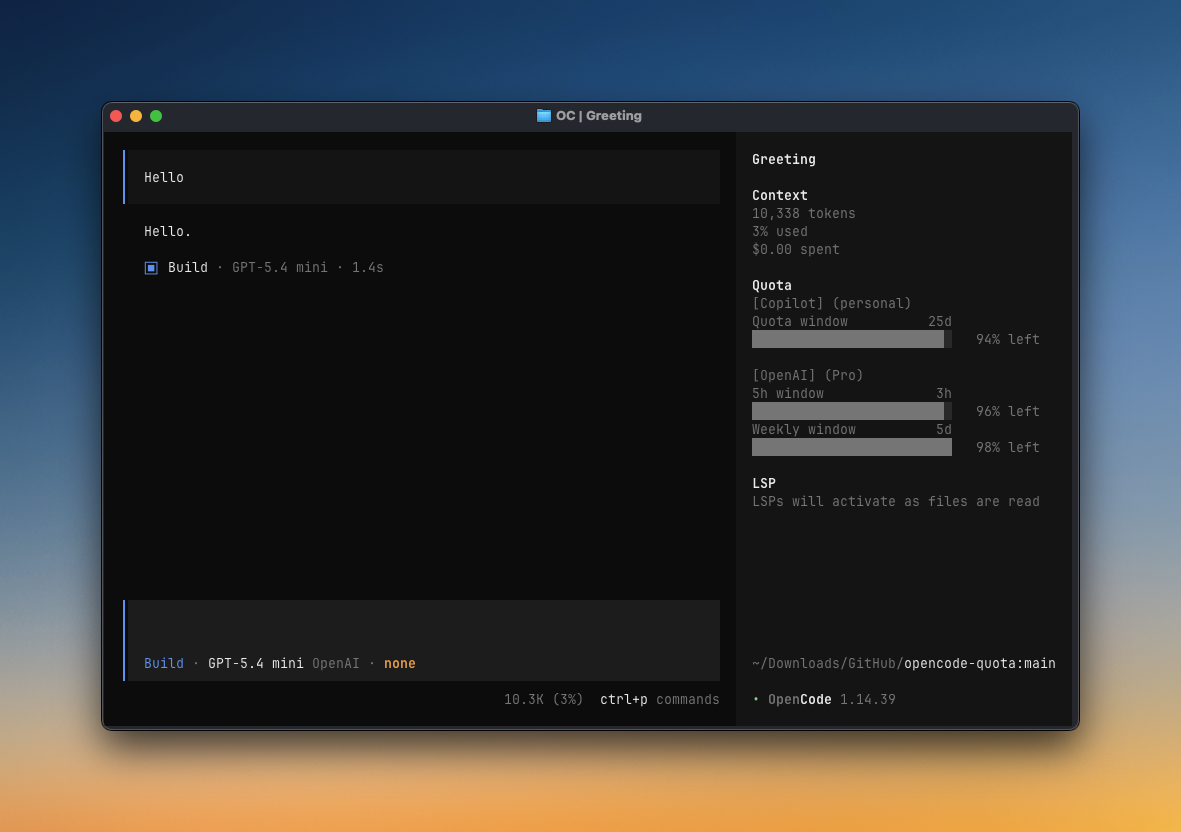
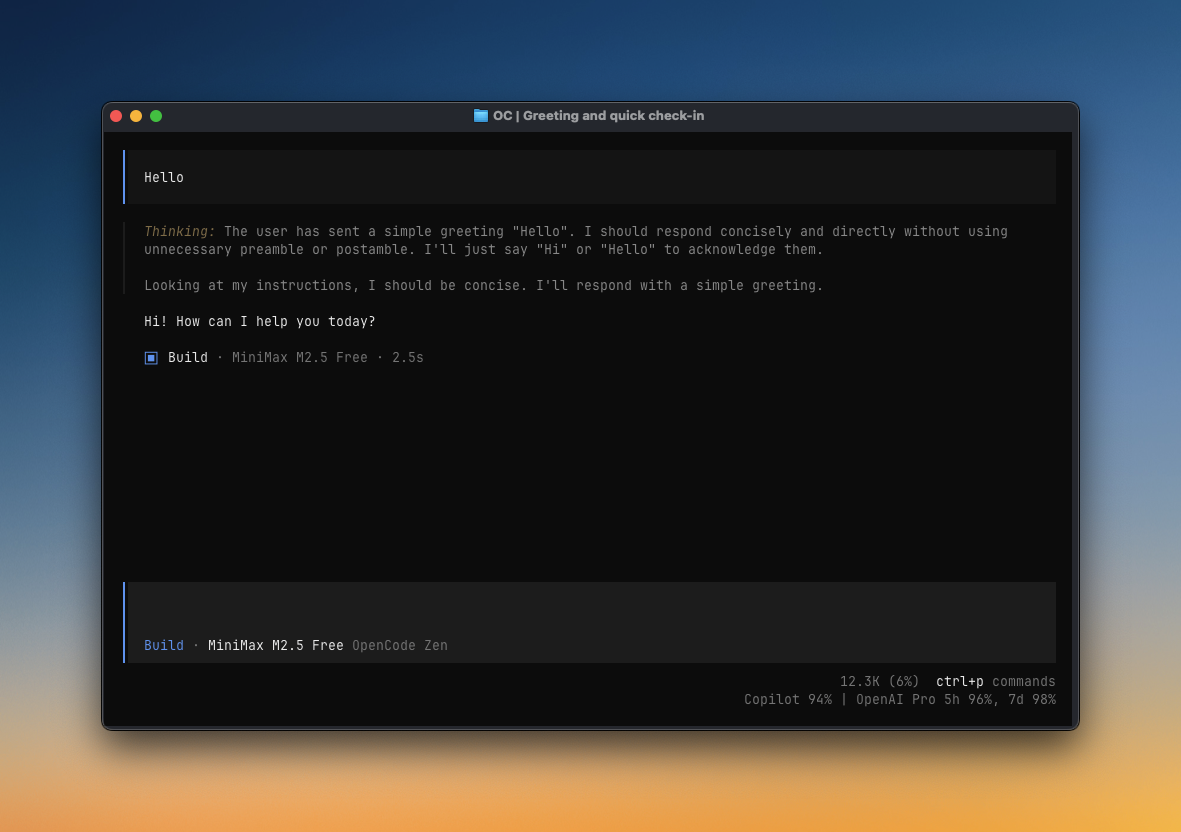
Quota. - If you enabled the compact status line, look at the bottom of Home or below the message input.
- If something looks wrong, run
/quota_statusin OpenCode or see Troubleshooting.
-
Close OpenCode.
-
Run:
npx @slkiser/opencode-quota@latest update
-
Review the exact config edits and cache directories, then confirm.
-
Restart OpenCode.
Use --dry-run to preview without changing anything. Otherwise, update shows the OpenCode Quota config and cache changes and asks before applying them. It leaves your other plugins and settings alone. Use --yes only when you intentionally need a noninteractive run.
|
|
| Sidebar panel A full quota view in OpenCode's session sidebar. |
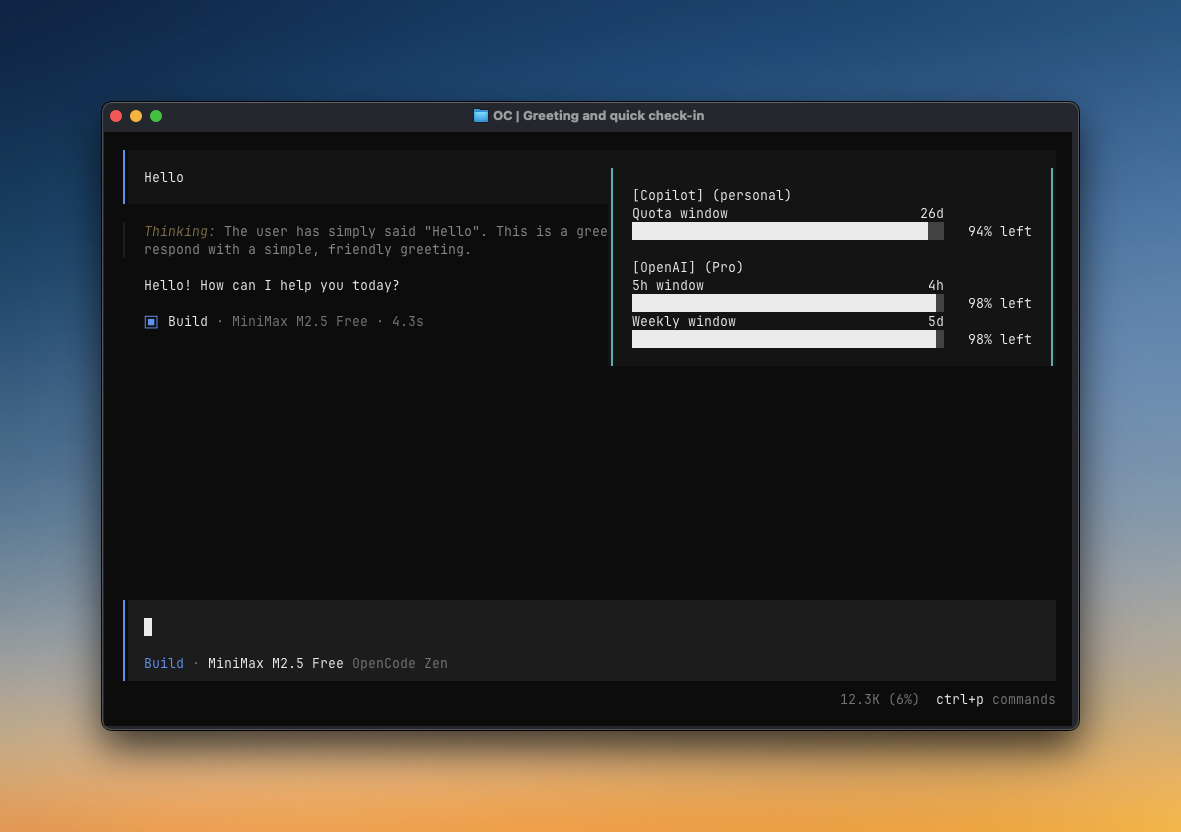
TUI toast Quota checks can appear automatically while you work. |
|
|
| Compact status line Short quota text on Home and below the message input. |
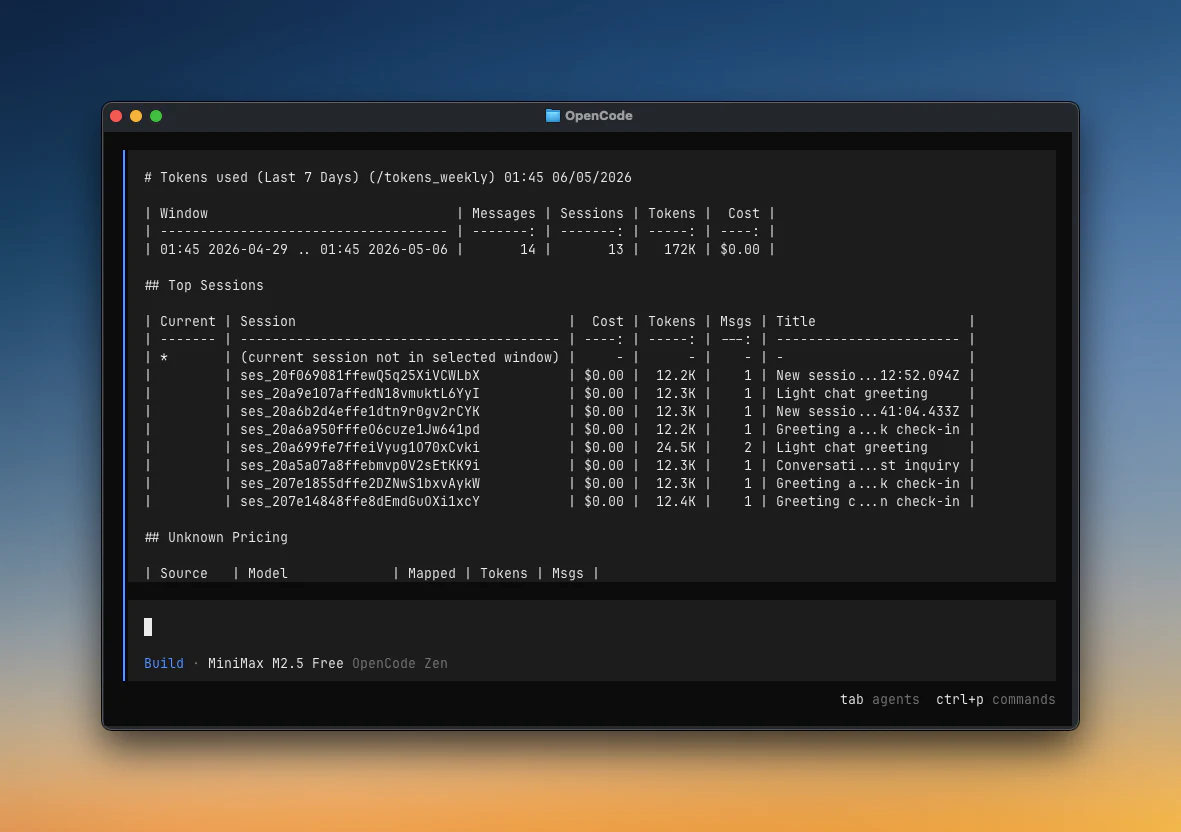
Token reports/tokens_today, /tokens_weekly, session reports, and more. |
More ways to use it:
- Check quota from a terminal with
opencode-quota show - Use JSON output in scripts, status bars, CI checks, and other tools
- Run the same slash commands in the TUI, Web, and Desktop
- Tune reset countdown precision without changing the default compact display
- Choose current-session or descendant-tree token totals across
/quota, toasts, the sidebar, and the compact input line - Diagnose authentication, quota sources, pricing, and maintainer notices
See Configuration for UI options and Manual install for setup details.
| Command | Use when |
|---|---|
/quota |
Show current quota |
/quota_status |
Diagnose setup, authentication, providers, pricing, and notices |
/quota_announcements |
Read active bundled maintainer notices |
/pricing_refresh |
Refresh local runtime pricing from models.dev |
/tokens_today |
Show tokens used today |
/tokens_daily |
Show tokens used in the last 24 hours |
/tokens_weekly |
Show tokens used in the last 7 days |
/tokens_monthly |
Show tokens used in the last 30 days, including pricing |
/tokens_all |
Show tokens used across all local history |
/tokens_session |
Show tokens used in the current session |
/tokens_session_all |
Show current session plus descendant sessions |
/tokens_between YYYY-MM-DD YYYY-MM-DD |
Show tokens used between two dates |
Use the CLI for scripts, CI, or a quick terminal check outside OpenCode.
| Command | Use when |
|---|---|
opencode-quota init --dry-run |
Validate and preview installer changes without writing files |
opencode-quota update |
Preview, confirm, and apply a scoped OpenCode Quota update |
opencode-quota update --dry-run |
Preview exact config and cache targets without changing them |
opencode-quota show |
Check quota from your terminal |
opencode-quota show --provider <id> |
Check one provider only, such as copilot or openai |
opencode-quota show --json |
Print JSON for scripts, status bars, and other tools |
opencode-quota show --json --threshold <pct> |
Fail when quota is low; return exit 2 for incomplete results |
opencode-quota status |
Run the same diagnostics as /quota_status from a terminal |
opencode-quota status --provider <id> |
Diagnose one provider by canonical ID or synonym |
opencode-quota status --json |
Print secret-safe JSON diagnostics for scripts and CI |
Most providers work automatically. If a provider has a “Needs setup” link, open that setup note only if you use that provider. Providers can appear in both audience sections when the vendor supports both.
Personal
| Provider | Auth/setup | Data from | Reports |
|---|---|---|---|
| Anthropic (Claude) | Needs setup | Local CLI/OAuth | Quota |
| Chutes AI | API key/config | Remote API | Quota |
| Cursor | Needs setup | Local estimate | Budget and spend |
| GitHub Copilot | Automatic OAuth / billing PAT | Remote API | Usage and budget |
| Google AGY | Needs setup | Remote API | Quota |
| Google Antigravity | Needs setup | Remote API | Quota |
| NanoGPT | API key/config | Remote API | Quota and balance |
| Ollama Cloud | Needs setup | Dashboard scraping | Quota |
| OpenAI | Automatic | Remote API | Quota |
| OpenCode Go | Needs setup | Dashboard scraping | Quota |
| OpenCode Zen | Needs setup | Dashboard scraping | Budget and balance |
| OpenRouter | Automatic | Remote API | Budget and spend |
| Synthetic | Automatic | Remote API | Quota |
| xAI SuperGrok | OpenCode OAuth (/connect xAI) |
Remote API | Quota |
Business / Enterprise
| Provider | Auth/setup | Data from | Reports |
|---|---|---|---|
| Anthropic (Claude) | Needs setup | Local CLI/OAuth | Quota |
| Chutes AI | API key/config | Remote API | Quota |
| Cursor | Needs setup | Local estimate | Budget and spend |
| Gemini CLI (deprecated) | Existing setups only | Remote API | Quota |
| GitHub Copilot | Automatic OAuth / billing PAT | Remote API | Usage and budget |
| Google AGY | Needs setup | Remote API | Quota |
| Google Antigravity | Needs setup | Remote API | Quota |
| NanoGPT | API key/config | Remote API | Quota and balance |
| OpenAI | Automatic | Remote API | Quota |
| OpenCode Zen | Needs setup | Dashboard scraping | Budget and balance |
| OpenRouter | Automatic | Remote API | Budget and spend |
| Synthetic | Automatic | Remote API | Quota |
| xAI SuperGrok | OpenCode OAuth (/connect xAI) |
Remote API | Quota |
Business placement describes vendor plan availability. Except for configured Copilot organization/enterprise billing, current integrations generally report one signed-in account, seat, API key, or workspace.
Gemini CLI quota support is deprecated for new installs. Existing v4 configurations still work, with removal planned for v5.0.0. See the provider guide before choosing a replacement.
Personal
| Provider | Auth/setup | Data from | Reports |
|---|---|---|---|
| Alibaba Coding Plan | OpenCode config | Local estimate | Quota |
| DeepSeek | API key/config | Remote API | Balance and status |
| Kimi Code | OpenCode config | Remote API | Quota |
| MiniMax Coding Plan | OpenCode config | Remote API | Quota |
| MiniMax Coding Plan (CN) | OpenCode config | Remote API | Quota |
| Qwen Code | Needs setup | Local estimate | Quota |
| Xiaomi MiMo | Needs setup | Dashboard API | Quota and balance |
| Z.ai Coding Plan | OpenCode config | Remote API | Quota |
| Zhipu Coding Plan | OpenCode config | Remote API | Quota |
Business / Team
| Provider | Auth/setup | Data from | Reports |
|---|---|---|---|
| Kimi Code | OpenCode config | Remote API | Quota |
| MiniMax Coding Plan | OpenCode config | Remote API | Quota |
| MiniMax Coding Plan (CN) | OpenCode config | Remote API | Quota |
| Zhipu Coding Plan | OpenCode config | Remote API | Quota |
These vendors offer team or business plans, but the current integrations report only the configured member API key rather than organization-wide usage.
The quota view uses short labels such as Day quota, 5h quota, Day budget, and Balance. Bar width varies by surface. JSON keeps the precise accounting type for scripts.
You can add a provider with an HTTPS quota API, or track a local usage estimate for one that does not have one. Run the guided setup:
npx @slkiser/opencode-quota@latest provider addOpenRouter works automatically with the API key already configured in OpenCode. A custom OpenRouter definition remains available when you need a different endpoint or label.
For another API, choose the response format it uses: quota-v1 for OpenCode Quota's standard response, json-v1 to point to each value in a JSON response, or openrouter-key-v1 for OpenRouter's key endpoint. The setup asks one question at a time, never asks for a response body or secret, and shows the complete config before saving.
Setup details live in the Provider setup guide.
If quota or token data looks wrong:
- Run
/quota_statusin OpenCode, oropencode-quota statusfrom a terminal for the same diagnostics. Useopencode-quota showfor a quick quota glance. - Confirm the expected provider appears in the detected provider list.
- Confirm companion auth plugins are before
@slkiser/opencode-quotainopencode.json. - If token reports are empty, start OpenCode once so it creates
opencode.db, then run a session with model usage. - Check Troubleshooting for common symptoms and provider-specific fixes.
Project guides:
External references:
- OpenCode docs
- OpenCode config
- OpenCode plugins
- OpenCode TUI
- models.dev pricing data
- Node.js downloads
Thanks to everyone who has contributed to OpenCode Quota.
MIT
OpenCode Quota is not built by the OpenCode team and is not affiliated with OpenCode or any provider listed above.