

GT Telemetry is a module for reading Gran Turismo race telemetry streams in Go.
- Support for all known fields in the telemetry data packet.
- Support for all current telemetry formats (A, B, ~, and C).
- Access to data in both metric and imperial units.
- Live streaming from UDP network sources or playback from recorded files.
- Batch file scanning via an iterator for high-speed processing of telemetry data.
- Recording of telemetry data to plain or compressed files.
- Live update of vehicle and circuit inventory databases from a remote server.
- Custom vehicle and circuit definitions to override the embedded database and data provided by live updates.
- Computed differential gear ratio based on the rolling wheel diameter of the driven wheels.
- A vehicle inventory database with methods for providing the following information on a given vehicle ID:
- Manufacturer
- Model
- Year
- Drivetrain
- Aspiration
- Type (racing or street)
- Racing category
- Open cockpit exposure
- A circuit inventory database with methods for matching a circuit based on a given coordinate and providing the following information:
- Name
- Length
- Region
To start using gt-telemetry, install Go 1.25.0 or above. From your project, run the following command to retrieve the module:
go get github.com/zetetos/gt-telemetry/v2Construct a new GT client and start reading the telemetry stream. All configuration fields in the example are optional and use the default values that would be used when not provided, with the exception of UpdateBaseURL which defaults to an empty string, resulting in auto-update being disabled.
import "github.com/zetetos/gt-telemetry/v2"

main() {
    options := gttelemetry.Options{
        Source: "udp://255.255.255.255:33739"
        Format: telemetryformat.Addendum3,
        LogLevel: "warn",
        StatsEnabled: false,
        CachePath: "data/cache",
        UpdateBaseURL: "https://static.zetetos.com/gt7/data",
    }
    gtclient, _ := gttelemetry.New(options)
    go func() {
        err, recoverable = gtclient.Stream(context.Background())
        if err != nil {
            if recoverable {
                log.Printf("Recoverable error: %s", err.Error())
            } else {
                log.Fatalf("Fatal client error: %s", err.Error())
            }
        }
    }()
}
If the PlayStation is on the same network segment, then you will probably find that the default broadcast address 255.255.255.255 will be sufficient to start reading data. If it does not work then enter the IP address of the PlayStation device instead.
Read some data from the stream:
    fmt.Printf("Sequence ID:  %6d    %3.0f kph  %5.0f rpm\n",
        gt.Telemetry.SequenceID(),
        gt.Telemetry.GroundSpeedKPH(),
        gt.Telemetry.EngineRPM(),
)Vehicle and circuit definitions can be downloaded over the web at runtime without needing to update the Simtezilo version.
Updated vehicle and circuit definitions are stored in the cache directory under vehicles and circuits subdirectories.
Along with circuit and vehicle-specific files, an additional manifest.json file is stored in each of the directories
listing all of the available identifiers along with the last modified time. GT Telemetry uses this file to determine which
vehicles and circuits are newer and only downloads those required.
A version.json file is also stored in the base directory of the object store which contains separate latest modified
times for the circuit and vehicle definitions. This file allows GT Telemetry to quickly determine if there are any new
circuits or vehicles without having to download large manifest files and helps keep data transfer costs to a minimum.
Vehicle and circuit data can be published to any HTTP accessible object store supported by Rclone.
First, you will need to configure Rclone to access the object store of choice and, once complete, the JSON data in pkg/vehicles/inventory and pkg/circuits/inventory can be synchronised using the following command (in this example, an Rclone profile for Cloudflare R2 named r2:gt7):
R2_REMOTE=r2:gt7 make releaseVehicle and circuit definitions stored in the cache directory will override the embedded database. Typically the files in
these directories are populated by automatic updates, however, if you would like to create your own custom definitions then
simply add a file to the appropriate directory and make sure the lastModified timestamp is far in the future and it will
not be overwritten by the automatic update feature.
Note that these files will be deleted if the cache is cleared via the web UI, so make sure to back up the custom files beforehand.
Offline saves of replay files can also be used to read in telemetry data. Files can be in either plain (*.gtr) or compressed (*.gtz) format.
Read telemetry from a replay file by setting the Source value in the gttelemetry.Options to a file URL, like so:
config := gttelemetry.Options{
    Source: "file://data/replays/demo.gtz"
}Replays can be captured and saved to a file using cmd/capture_replay/main.go. Captures will be saved in plain or compressed formats according to the file extension as mentioned in the section above.
A replay can be saved to a default file by running:
make run/capture-replayAlternatively, the replay can be captured to a compressed file with a different name and location by running:
go run cmd/capture_replay/main.go -o /path/to/replay-file.gtzThe GT Telemetry client provides built-in methods for recording telemetry data to files during runtime. This allows you to start and stop recording at any point in your application.
Basic usage:
// Create a telemetry client.
client, err := gttelemetry.New(gttelemetry.Options{
    Source: "udp://255.255.255.255:33739", // Live telemetry
})
if err != nil {
    log.Fatal(err)
}

// Start recording to a compressed file.
err = client.StartRecording("my_recording.gtz")
if err != nil {
    log.Fatal(err)
}

// Your application logic here...
// Telemetry data will be automatically recorded at the same time.

// Stop recording
err = client.StopRecording()
if err != nil {
    log.Fatal(err)
}

// Check if currently recording.
if client.IsRecording() {
    fmt.Println("Recording is active")
}
Supported file formats:
.gtr- Plain binary telemetry data.gtz- Compressed telemetry data (recommended for storage efficiency)
The vehicle_inventory CLI tool allows you to sync data with the Gran Turismo website and also import and export vehicle inventory data between JSON and CSV formats. The tool uses action-based commands and outputs to stdout, making it compatible with Unix pipes and redirections.
Synchronisation will default to vehicle data in British English.
go run tools/vehicle_inventory/*.go update pkg/vehicles/inventoryTo synchronise in another language, add the locale code to the command:
go run tools/vehicle_inventory/*.go update pkg/vehicles/inventory jpMost data is synchronised with the exception of the following fields which need to be manually updated by searching for vehicle specifications on the Internet:
- CarType
- Wheelbase
- TrackFront
- TrackRear
- EngineLayout
- EngineBankAngle
- EngineCrankPlaneAngle
go run tools/vehicle_inventory/*.go convert pkg/vehicles/inventory > inventory.csvgo run tools/vehicle_inventory/*.go convert inventory.csv pkg/vehicles/inventoryThe generated manifest is printed to stdout.
go run tools/vehicle_inventory/*.go manifest pkg/vehicles/inventoryThe CSV format includes the following columns:
- CarID: Unique vehicle identifier
- Manufacturer: Vehicle manufacturer
- Model: Vehicle model name
- Year: Model year (0 for unknown)
- OpenCockpit: Boolean indicating if the vehicle has an open cockpit
- CarType: Vehicle type (street, race)
- Category: Racing category (e.g., Gr.1, Gr.3, Gr.4, Gr.B)
- Drivetrain: Drivetrain type (FR, FF, MR, RR, 4WD)
- Aspiration: Engine aspiration (NA, TC, SC, EV, etc.)
- Length: Length of the vehicle in millimetres
- Width: Width of the vehicle in millimetres
- Height: Height of the vehicle in millimetres
- Wheelbase: Distance between the centreline of the front and rear wheels in millimetres
- TrackFront: Distance between the centreline of the front left and right wheels in millimetres
- TrackRear: Distance between the centreline of the rear left and right wheels in millimetres
- EngineLayout: Engine layout configuration
- EngineBankAngle: Engine cylinder bank angle in degrees
- EngineCrankPlaneAngle: Engine crank plane angle in degrees
The circuit_capture and circuit_inventory CLI tools are used to capture circuit coordinate data from live telemetry and compile it into the inventory database.
To capture a circuit, do the following preparations:
- In GT7 select a Gr.3 vehicle for general consistency with existing captures
- Navigate to the circuit in World Circuits
- Enter a time trial for the specific track layout (variation), any time of day. Don't enter the event by clicking start, as the console will be driving a car around the circuit in the background.
Once preparations are complete, run the following command with appropriate circuit details. The capture will start when the vehicle passes the start line and end when a full lap is completed.
go run tools/circuit_capture/main.go \
    -d "data/circuits" \
    -n "Suzuka Circuit" \
    -v "Suzuka Circuit East Course" \
-c "jp"The circuit_inventory tool processes captured circuit files and writes per-circuit inventory JSON files.
To compile all captured circuit data into per-circuit inventory files:
go run tools/circuit_inventory/main.go update data/circuits pkg/circuits/inventoryThe generated manifest is printed to stdout.
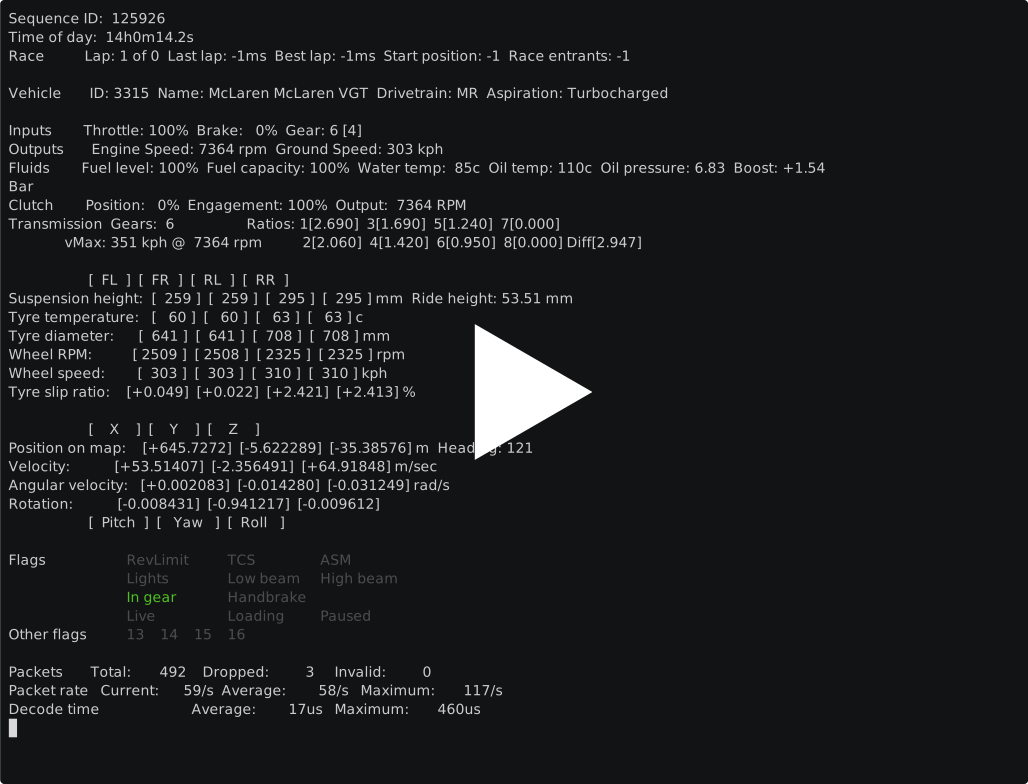
go run tools/circuit_inventory/main.go manifest pkg/circuits/inventoryThe examples directory contains example code for accessing most data made available by the library. The example app shown at the top of this page can be run against a replay file with the following command:
make runThe example code can also read live telemetry data from a PlayStation by removing the Source field in the GTClientOpts.
Special thanks to Nenkai for the excellent work documenting the Gran Turismo telemetry protocol.